


Bit Assist: The Multi-Channel Chat Widget Plugin for WordPress
Running a website isn’t an easy job. You often miss customer messages while juggling too many platforms. You check WhatsApp, then Facebook, then email. Messages slip through. Visitors leave without connecting. Most chat plugins support only one messaging channel and charge high monthly fees.
Whereas Bit Assist comes with a simple interface with 30+ messaging channels. It includes all the popular social channels, WhatsApp, Facebook Messenger, Telegram, Instagram, and more. It integrates with live chat tools such as Tidio, Tawk, Intercom, and Crisp.
This widget is super lightweight and affordable under$30. Whatever channel you add, with Bit Assist, you have full control over customization. Starting from widget color, style, and more, you can easily match your brand colors with this chat plugin. It helps you reduce support workload, boost conversions, and engage visitors instantly from any page on your site.
Let’s explore how Bit Assist works and what makes it a must-have WordPress chat plugin.
What is Bit Assist?
Think of Bit Assist as a Swiss Army knife for customer communication. It is a WordPress chat plugin that brings all the messaging channels in one place. It remains as a floating button that normally sits on the bottom-right corner of the website. When visitors click it, they see all your contact options.
The plugin connects your site with famous social platforms and messaging apps. It also works well with live chat tools, integrates with WooCommerce store, Google Analytics, etc. You can also send form data to any third-party platforms via webhooks. With these advanced features, businesses can easily enhance customer experience and capture more potential leads.
Let’s explore some powerful features of Bit Assist :
30+ Messaging Channels in One Widget
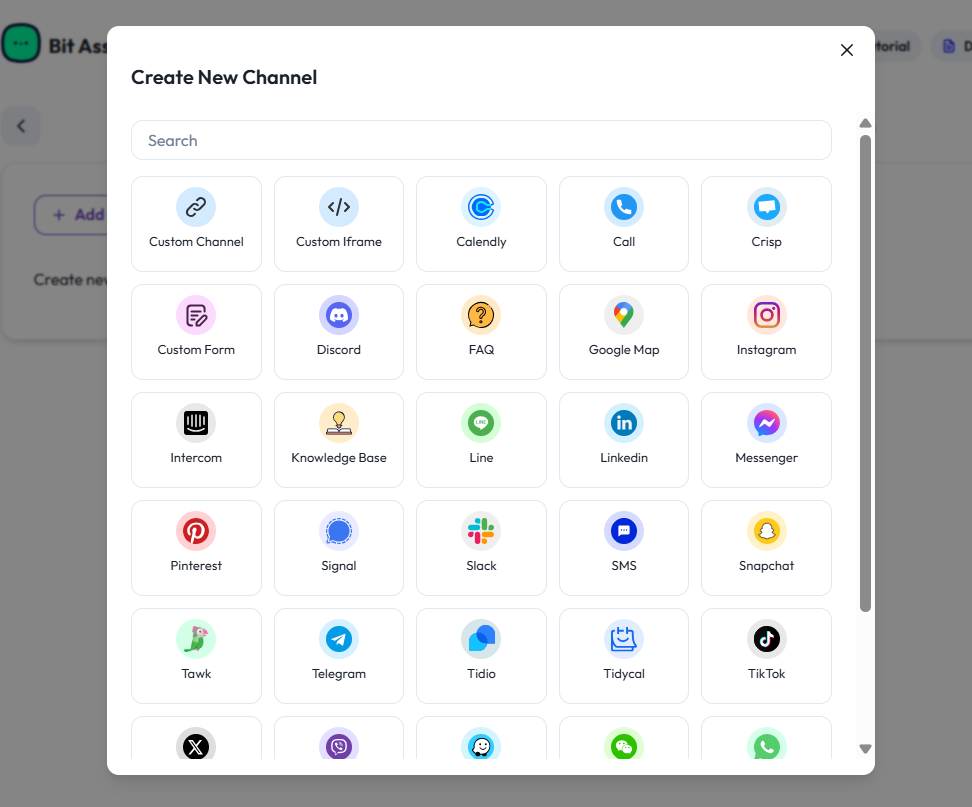
The plugin supports more than 30 popular platforms. You get chat channels and social platforms like WhatsApp chat, Facebook Messenger, Telegram, Instagram, Snapchat, TikTok, and more. Other than these channels, you can make direct calls, add FAQ buttons, custom forms, custom channels, etc.
Your visitors can choose their favorite way to contact you. They don’t need to search for the contact us page. They click and start chatting. This removes friction from customer support.
You can activate multiple channels at once in a single widget.
Live Chat Integration Without the Cost
Bit Assist is not a live chat system itself. But it works perfectly with popular live chat tools. It integrates with multiple live chat tools like Tidio, Tawk.to, Crisp, and Intercom.
This way, you can enable a live chat functionality inside a chat widget without building one from scratch. Your existing live chat subscription works through the Bit Assist widget.
Many businesses already pay for live chat services, which are actually quite high for small startups. While Bit Assist lets you show those live chat platforms alongside free messaging apps at a very affordable price under $30.
Custom Contact Forms That Capture Leads
The plugin includes a powerful channel custom form. You can create contact forms tailored to your business needs. Add text fields, dropdowns, checkboxes, file uploads, feedback, and rating fields with stars or smileys. You can also mark fields as required or optional.
These forms will appear inside the chat widget. Visitors no longer have to leave your page to contact you. This smooth experience increases submission and conversion rate to a great extent. Plus, you can collect potential lead information for further collaboration.
WooCommerce Order Tracking
Online stores need quick customer support. That’s why WooCommerce integration allows customers to check orders instantly. How? Customers simply have to enter their order ID or billing email. The system automatically fetches data in seconds and shows order status and shipping details.
This reduces customer support tickets. Customers get answers without waiting. Your customer support team doesn’t have to juggle the online store to know product details. They can focus on other critical activities. This useful integration saves time and frustration.
FAQ and Knowledge Base Support

The floating FAQ button is also available in Bit Assist. You can add an FAQ section directly inside your chat widget. Create questions and answers about common topics.
The knowledge base channel works similarly. You can link articles, guides, add image links, etc. Visitors can access helpful resources from the same button. Visitors love these self-service options. They can solve problems on their own when possible.
Both features reduce your customer support workload. They give customers instant answers. Your team focuses on complex issues that need human attention.
WordPress Search Integration
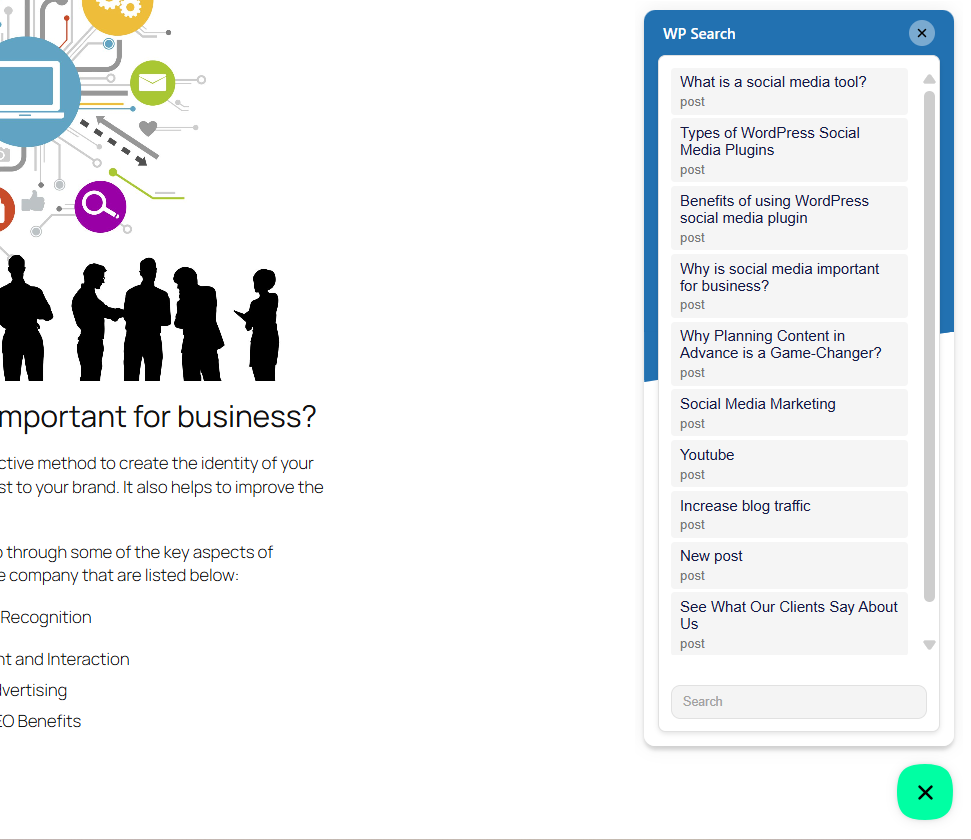
Bit Assist offers a very unique channel, the WP Search channel. It basically adds a search button to your widget. Visitors can search your entire WordPress site and find blog posts, pages, and products.
The search works fast and displays clean results. Visitors stay engaged with your content.
This feature turns your chat widget into a discovery tool. People find what they need without leaving the conversation interface.
Custom Channel for Unlimited Flexibility
Sometimes, the 30+ built-in communication channels might not be enough. You might want to redirect your visitors to a specific website or page. That’s where the custom channel feature comes into play.
You can add any website URL as a channel. Yes, you heard it right!
Just paste the link and customize the button icon. Also, you can add a channel title. Choose where it opens – new tab, current tab, or new window. That’s it!
Custom iFrame Integration
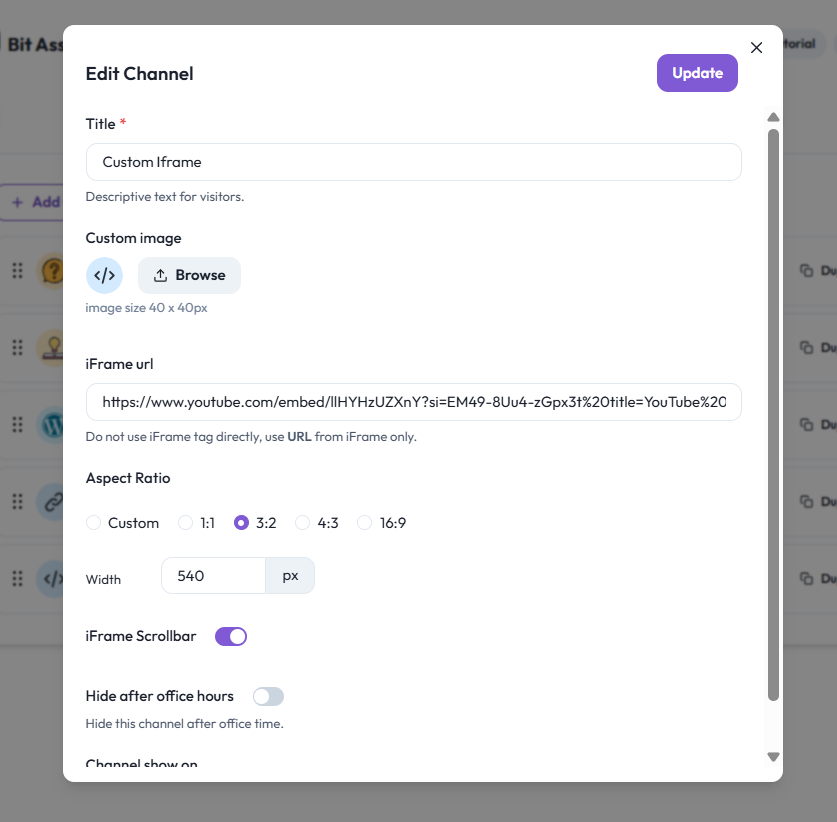
The custom iframe channel takes integration further. It embeds websites, YouTube videos, or a location inside your widget. You just need to add the URL. Visitors can interact without leaving your page.
You control the iframe size with predefined aspect ratios or custom dimensions. You enable or disable scrollbars based on content. The iframe loads smoothly and displays perfectly.
Complete Widget Customization

Bit Assist gives you full control over appearance. You can choose the widget position, the size, and the shape. Additionally, you can pick colors that match your brand.
The plugin offers multiple button styles. You can use waggle, jump, or shockwave animations to grab attention. These animations are subtle but effective. They increase click rates without being annoying.
You control behavior, too. The widget can open on click, on hover, or stay open by default. With “Trigger Widget” set when it first appears, after a few seconds, or on scroll. These Smart triggers help you catch visitors at the right moment.
Custom CSS for Advanced Styling

The custom CSS feature of this chat widget is impressive. With this feature, you can change colors, heights, widths, positions, and more. Add your own CSS code directly in the dashboard.
This is perfect for developers who want pixel-perfect designs. You can align with your brand guidelines and create a unique design. The CSS editor gives you unlimited creative freedom.
You can even display channels horizontally instead of vertically. The documentation also includes ready-made CSS snippets. Just copy, paste, and customize to your needs.
Call to Action Messages
You can display interactive call-to-action prompts. These messages appear after visitors spend time on your page. They encourage engagement at the perfect moment.
These are customizable, write your own message, and decide when it’ll appear on the visitor’s screen.
Smart Targeting Features: Business Hours and Page Filters
Bit Assist also covers excellent targeting features like setting business hours and adding page filters.
Setting business hours means you can show when your team is available. This manages customer expectations and prevents off-hours frustration.
With Page filters, you set where the widget appears. For example, if you want to show it on product pages but hide it on checkout pages, you can do this easily.
Analytics and Tracking

The Pro version includes Widget Analytics. Here, you can view how many visitors view and click the widget. With this feature, track which channels get the most attention. This data helps you optimize your customer support operations.
You can also enable Google Analytics integration and track widget interactions through Google Tag Manager. Get detailed insights into customer behavior. Make data-driven decisions about your communication channels.
External Publishing

One of the most powerful features of Bit Assist is External Publishing. You can use Bit Assist on sites beyond WordPress. It works on Shopify, Wix, Squarespace, Drupal, Joomla, and any HTML site.
Add your website domain where you want to use the widget. Then copy and paste the script into your external site. The widget works the same way.
Webhook Integration
You can send form data to external platforms automatically via webhook. You don’t need to manually transfer information anymore. You simply have to paste the webhook URL from your automation platform into Bit Assist.
This could be your CRM, email marketing tool, project management tool, or any other tool. You can also send data to multiple third party platforms at the same time with automation tools like Bit Flows. I can give you some real world examples:
- Send form submissions directly to HubSpot or Salesforce CRM
- Add new contacts to Mailchimp or ActiveCampaign automatically
- Update Google Sheets with every submission for tracking
Real Examples of How Businesses Use Bit Assist
Understanding features is helpful. Now that every crucial feature of Bit Assist is understood, next, have a look at some practical ways businesses can use Bit Assist.
E-commerce Customer Support. An online store can add WhatsApp, Facebook Messenger, and the WooCommerce tracking button. And give customers the freedom to choose how they can contact the team. They then check orders without creating tickets. The store handles more customers with the same team size.
Consulting Firm. A consulting firm can add a custom contact form and FAQ button. With this one button, visitors can submit inquiries directly through the widget. Common questions get answered through FAQ button. The business successfully captures more qualified leads.
Blogging Site. A blogging site can add a WP Search button and a knowledge base. This way, readers can find related articles easily. They discover more content without leaving the page. Bounce rate decreases and time spent on site increases significantly.
Local Business Appointments. For example, a salon can add Calendly integration and an SMS button. Customers can book appointments or text questions. Everything happens through one simple widget. The booking rate improves dramatically.
International Support Team. A SaaS company can add Telegram, WhatsApp, Discord, and Slack. Different regions prefer different platforms. Everyone gets support through their favorite channel. Customer satisfaction scores rise.
These examples show the flexibility that Bit Assist can adapt to your specific needs. You build the communication hub that works for your business.
Why Choose Bit Assist?
Many chat plugins exist. What makes Bit Assist different? Well, the question is valid, so is the reason.
First, it gives you a real choice. Many popular plugins either support one or two channels or support too many channels at quite a high price. Whereas Bit Assist offers 30+ communication channels of different categories, at a pocket friendly price.
Second, the setup process of each channel is very easy, unlike other chat plugins.
Third, it respects your budget. It’s an affordable chat plugin with no monthly charges or recurring fees that increase with traffic. You pay once for lifetime access.
Fourth, it stays lightweight. The plugin loads fast and doesn’t slow down your site. Since speed matters for SEO and user experience. Bit Assist protects both. To use Bit Assist, you don’t need to be a technical expert.
Fifth, it grows with you. Start with free channels. Add Pro features when you feel like you need them. Scale your communication without changing systems. For your information, almost all chat channels are on the free plan.
Free vs Pro: Making the Right Choice
The free version includes powerful features. You get 24 channels, including WhatsApp, Facebook Messenger, Instagram, Telegram, and more. You can customize position, colors, and behavior. You can set triggers and animations.
This works perfectly for small businesses and startups that want an affordable chat plugin without complex subscriptions.”
The Pro version adds advanced capabilities. You get live chat integrations, WooCommerce tracking, FAQ, knowledge base, and WP Search. You gain analytics, business hours, page filters, and external publishing. Webhooks unlock automation possibilities.
Pro suits growing businesses and agencies. You manage multiple clients or sites. You need detailed insights and advanced control. The lifetime pricing makes it a smart long-term investment.
Pricing That Makes Sense
Bit Assist offers four pricing tiers. All include lifetime access with no recurring fees. Making Bit Assist one of the best WordPress chat plugins under $30 for many users.
Starter Annual costs $19 per year for one site. This includes all Pro features with annual updates and support.
Starter Lifetime costs $49 one time for unlimited sites. You pay once and use it forever. Updates and support are included.
Agency Annual costs $59 per year for one site. This gives you priority support and advanced features.
Agency Lifetime costs $209 one time for unlimited sites. This is the best value for agencies and developers. You get everything forever.
The lifetime options eliminate ongoing costs. You budget once and move forward. No surprises. No sudden price increases.
GDPR Compliant and Secure
For Bit Apps, data privacy matters. Bit Assist is GDPR compliant. It respects user privacy and follows regulations. You can add consent forms to your contact forms, this will build trust among customers.
The plugin runs on your WordPress server. Your data stays with you. Nothing is sent to external services without your control. You maintain full ownership of customer information.
A Final Thought on Bit Assist
Communication should be simple. Bit Assist removes the barriers between you and your customers. It gives them choice and control. It does this without complexity or high costs.
If you run a WordPress site and want better customer connections, Bit Assist delivers. It is powerful enough for agencies and simple enough for beginners. And the most important fact is, it is affordable for everyone.
For many businesses, this plugin becomes essential. It turns scattered communication into organized support and builds relationships that drive growth.
Try Bit Assist today. Give your visitors the communication flexibility they want. Watch your customer engagement to rise. And thank us later.


