


6 Best Dedicated IP VPN Services Compared: Static IP, Port Forwarding, Pricing
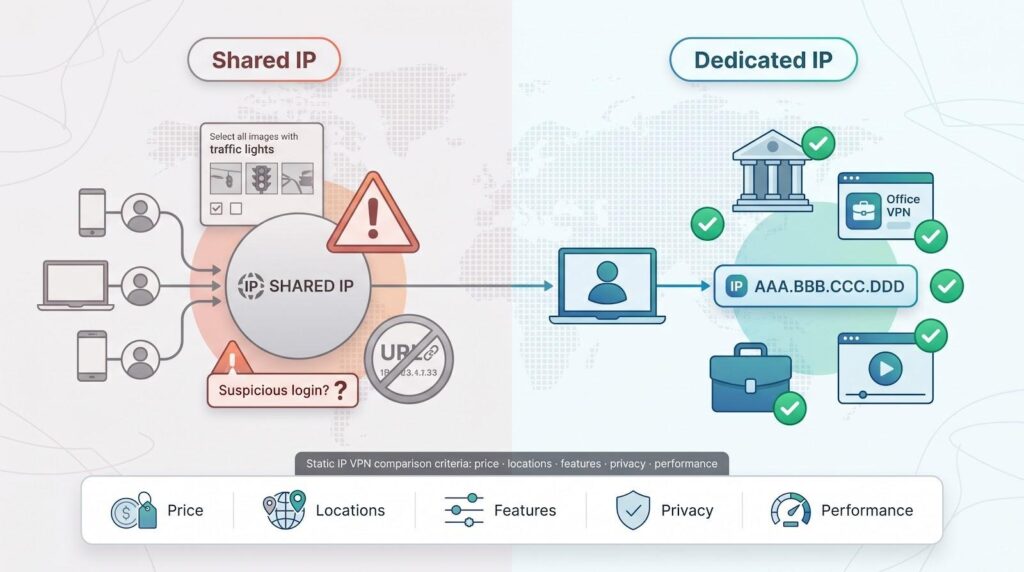
Sharing a VPN server means inheriting its baggage—blacklists, CAPTCHAs, and constant “Is this really you?” prompts. A dedicated IP replaces that clutter with one private address that’s yours every session.
With a fixed identity, you slip into banking sites, remote-work dashboards, and streaming apps with far fewer verification hurdles, according to a BleepingComputer guide.
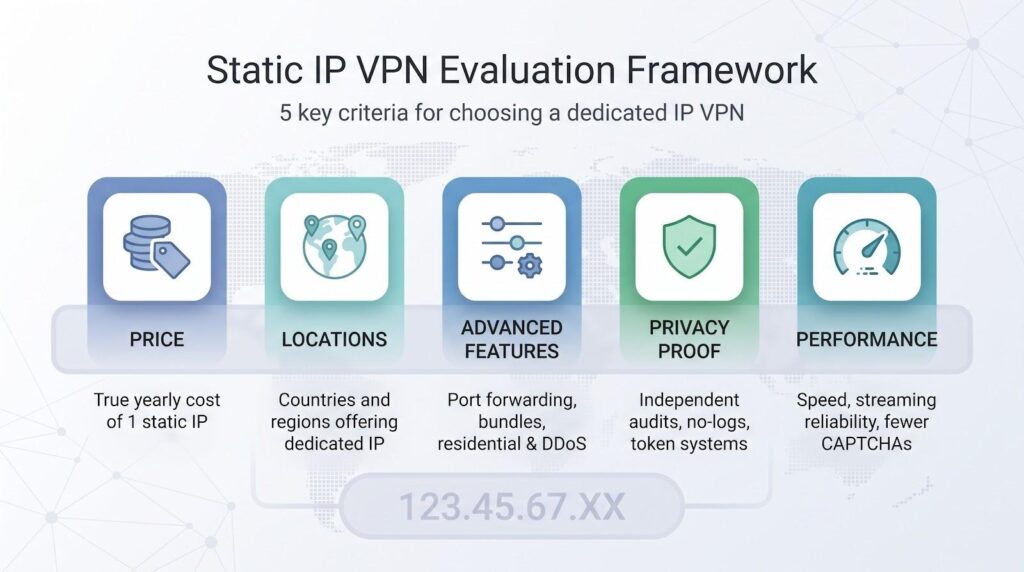
Our evaluation criteria for static IP VPNs
Before ranking anything, we needed a clear yardstick. We built one that mirrors the real-world tasks you face when a single, fixed IP address matters.
First comes true cost. A static IP is never “free,” but the premium varies widely. We compared what you pay over a full year, from roughly seventy dollars with NordVPN to ninety dollars for three years with PIA, so you can spot value at a glance.
Next is geographic choice. A dedicated IP only helps if it is available where you need it. We counted the countries each provider covers and awarded extra credit for less common regions such as Japan or Singapore, not just the usual United States and United Kingdom.
Functionality followed. Port forwarding, multi-IP bundles, and specialty options like residential or DDoS-protected addresses turn a “nice to have” VPN into a tool you can host on, whitelist, or even build a small business around. We weighed those extras heavily.
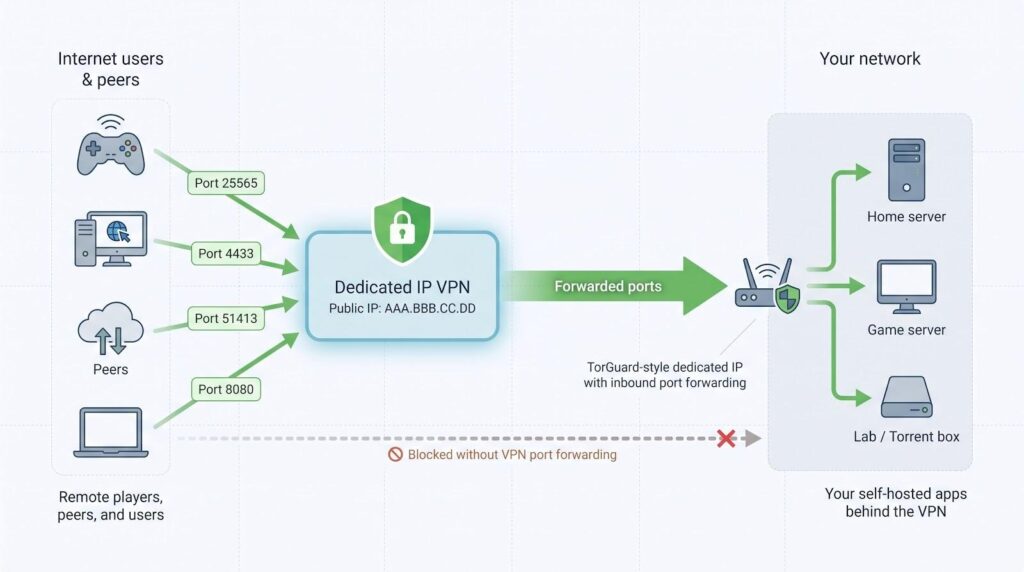
TorGuard provides a clearer yardstick: the Pro tier (currently advertised at about $60 per year) bundles one dedicated IP with unlimited port forwarding, and you can later layer on residential or DDoS-shielded addresses if a client portal or game server needs added legitimacy.
Its own setup guide notes that any dedicated IP can forward “all ports above 2048” over TCP or UDP, so self-hosted apps rarely have to change default configs.
Breadth like this is exactly why we rank functionality nearly as high as headline price.
Privacy could not take a back seat just because the IP is yours alone. We favored providers with recent, third-party no-logs audits or token systems that unlink the IP from your customer record. That way you gain stability without surrendering anonymity.
Finally, we looked at everyday usability: speed consistency, streaming success, and the welcome absence of CAPTCHA roadblocks. We pulled those signals from independent speed tests and real user threads, not vendor promises.
We scored each service across five dimensions: price, locations, advanced features, privacy proof, and day-to-day performance. The combined total drives the ranking you will see next.
At-a-glance comparison
Numbers tell their story faster than any paragraph. The table below distills the six contenders into the metrics we just outlined: price, locations, advanced extras, privacy proof, and refund safety net, so you can spot the front runner for your exact need in seconds.
| Provider | Yearly cost for 1 static IP* | Countries offering dedicated IP | Port forwarding | Privacy audit / token system | Money-back window |
| TorGuard | Included in Pro plan (~$156/yr) or $60 add-on | 30+ | Yes | No-logs policy (US); self-audited | 7 days (IP fee non-refundable) |
| NordVPN | $70 add-on | 25+ | No | PwC audit; account-linked (token rollout pending) | 30 days |
| Private Internet Access | $90 for 3 years | 10+ | Yes | Deloitte audit; anonymous token | 30 days |
| Surfshark | $45 on a 2-year bundle | 11+ | No | Deloitte audit; delink option | 30 days |
| CyberGhost | $60 for 2 years | 7 | No | Deloitte audit; anonymous token | 45 days |
| PureVPN | ~$24 on 1-year promo | 17 | Yes (paid add-on) | KPMG audit; no-logs verified | 31 days |
*Table shows the cheapest advertised long-term deal available in July 2026. Monthly plans cost more.
Scan the columns and patterns appear. NordVPN and TorGuard lead on location breadth, yet only TorGuard allows port forwarding for hosting. PIA offers the lowest monthly rate if you commit to three years, while CyberGhost’s 45-day guarantee provides the longest trial.
This snapshot is only a starting point. We will unpack each service in detail next, but keep this table handy for quick cross-checking as we move through the reviews.
1. TorGuard: best for power users, port forwarding, and niche IP types
TorGuard dedicated IP VPN product page screenshot.
TorGuard is not the most polished app, but it is the most configurable. If you tweak firewall rules, seed torrents overnight, or run a small game server, you will welcome the extensive settings on offer.
Flexibility is the headline feature. With TorGuard’s dedicated IP VPN, you can choose from more than thirty static-IP countries—not just data-center ranges—and the service’s reputation management helps those addresses sail past CAPTCHA screens and bank logins alike. TorGuard also sells residential and streaming-optimized IPs that resemble a home internet connection, which can mean the difference between signing in to Netflix or facing another proxy error.
Port forwarding comes standard: no extra fee, no support ticket. Open the ports you need, map them to your fixed IP, and your self-hosted project is live. Many rivals block or throttle this feature, so TorGuard dominates the hosting and P2P niche.
Pricing is direct. The Pro plan includes one dedicated IP. Need more or want a residential label? Add them à la carte and keep stacking as many as your workflow requires. The seven-day refund window is shorter than competitors, but that is the trade-off for instant IP activation.
TorGuard’s interface is utilitarian. Expect checkboxes for cipher choice, script hooks, and proxy chaining rather than glossy animations. For tinkerers and sysadmins, that is a plus. For someone who just wants a single Connect button, the learning curve may feel steep.
Choose TorGuard when you value control over cosmetics and need a dedicated IP that can host, stream, and dodge CAPTCHA obstacles without slowing you down.
2. NordVPN: best overall balance of speed, reach, and privacy
NordVPN tops our list because it nails the three things a dedicated-IP user cares about most: coverage, consistency, and credibility.
Start with coverage. Nord’s paid static IPs span 28 countries, more than any other mainstream provider, according to Tom’s Guide. Whether you need a United States address for payroll logins or a Japanese IP for game servers, the option is likely available.
Consistency shows up in both performance and price transparency. Speeds stay near the front of the pack, helped by a network upgrade that now pushes 100 Tbps of total capacity. The dedicated-IP add-on costs about seventy dollars per year on top of any plan, according to BleepingComputer. It is not pocket change, but it is fair value for a private lane on one of the fastest VPN networks.
Credibility comes from audits and features. Independent PwC checks and a strict no-logs policy mean the company cannot tie traffic to you, even though the IP itself is exclusive. A token-based allocation system is in development to break the link between the address and your account, which will push privacy further.
Where NordVPN fits on the wish-list spectrum:
- You want a single, reliable IP that works everywhere, from Netflix to a whitelisted corporate firewall.
- You need multiple static IPs under one account, and Nord lets you stack them.
- You prefer polished apps with extras such as Threat Protection and Meshnet instead of tweaking advanced settings by hand.
Skip Nord only if port forwarding is essential (it is blocked across the network) or if you are chasing the absolute lowest long-term price. For most readers who want to lock down one dependable digital identity, this is the starting point.
3. Private Internet Access: best long-term value and open-source trust
If you want a dedicated IP for the cost of a latte each month, PIA is the value leader. Commit to a three-year plan and the static-IP add-on averages about two-fifty per month, or ninety dollars total for three years of a personal address.
Low price does not mean low transparency. Every PIA app is open source, so anyone can review the code. Deloitte has already confirmed the company’s no-logs stance. The same report explains PIA’s blind-token system: redeem a voucher inside the app, receive an IP, and no database links the two.
Functionally, PIA sits between Nord’s polish and TorGuard’s power. Port forwarding is available on many servers, letting you seed torrents or expose a home lab through your dedicated IP. Speeds stay within ten percent of Nord on WireGuard, and PIA is known for reliability.
The interface is utilitarian yet friendly. You can adjust encryption, split traffic, or keep defaults and be protected in seconds. Unlimited simultaneous devices mean you, your partner, and a couple of test VMs can share the account without friction.
Choose PIA when budget and audit-grade privacy top your checklist, and you still want enough technical room to run a project or two from that fixed address.
4. Surfshark: best budget pick with unlimited devices
Surfshark’s pitch is simple: one low fee covers every gadget you own, and a dedicated IP costs less than a cup of coffee each month. That affordability makes static VPN access feel like a default feature, not a luxury add-on.
Location choice is modest, with more than a dozen sites across 11 countries, but that is enough for the traveler who only needs a steady United States or United Kingdom address for banking and Disney+. Speeds remain quick on WireGuard, and users report far fewer CAPTCHAs once they switch from shared to personal IP.
Setup follows Surfshark’s simple ethos. Buy the add-on, select your location, and a new tile labeled “Your IP” appears. Select connect and every phone, laptop, or smart TV on your account can share that identity at the same time, a flexibility many rivals restrict.
Surfshark trims features on the power-user front: no port forwarding, no multi-IP bundles, and a smaller audit record than Nord or PIA. If your priority is cost control plus the freedom to secure many devices under one roof, Surfshark stands out.
Choose it when you want a consistent IP on a tight budget and do not need advanced hosting tools.
5. CyberGhost: easiest setup and the longest refund window
CyberGhost is the quick-start choice: install the app, redeem your token, and you will have your own IP in under two minutes. No menus to decipher, no support tickets to file. That low-friction flow suits anyone who dreads tech chores.
The token system is the star. Buy a dedicated-IP voucher, paste the code once, and CyberGhost’s servers forget who redeemed it. The outcome is a static address the staff cannot link to your account, giving you privacy without paperwork.
Streaming fans appreciate the clarity. CyberGhost labels servers by the platform they unblock, and that approach applies to dedicated IPs as well. Users report stable access to Netflix, BBC iPlayer, and Hulu for months at a time, a rarity in the world of VPN blocks.
Speeds are solid, though not record-breaking, and there is no port forwarding. If you want to host a service, select TorGuard or PIA instead. For daily browsing, shopping, and binge-watching, CyberGhost feels effortless.
The 45-day money-back guarantee on multi-month plans is the longest in the industry. You can test a personal IP through an entire billing cycle or even a long trip abroad without risk. For newcomers to dedicated VPNs, that safety net matters.
6. PureVPN: widest country choice and business-friendly extras
PureVPN rounds out our list by doing one thing no rival matches: it offers dedicated IPs in seventeen countries, including less common spots such as Malta and Hong Kong. If your compliance scanner, client portal, or streaming habit requires a specific locale, PureVPN is often the only ready-made option available.
Adding the static IP is simple. Tick the checkbox at checkout and the address lands in your dashboard minutes later. Need protection from game-server griefers or botnet floods? You can add DDoS shielding to the same IP for a few extra dollars, a perk valued by gamers and small SaaS teams.
Port forwarding is available but costs extra, so budget for it if you plan to host. Speeds are respectable, though not top tier, and PureVPN’s apps received a welcome redesign in the past year. They are still not as slick as Nord’s, yet the clutter is gone and setup is straightforward.
Privacy has improved as well. After an early-2010s logging stumble, the company moved to the British Virgin Islands and passed an independent KPMG audit that confirmed its no-logs pledge. That turnaround makes its broad location menu easier to recommend.
PureVPN suits users with niche geography needs or small businesses that want to distribute multiple fixed IPs under a managed Teams console. It focuses less on raw performance and more on meeting regulatory or regional requirements that other providers do not address.
Dedicated IP vs. shared IP: weighing the trade-offs
A shared VPN server is like a crowded airport lounge, where everyone boards through the same gate and it is nearly impossible to tell who did what inside. Great for anonymity, but tough on reputation. If one traveler misbehaves, the whole lounge ends up on a watch list and every future visitor gets extra screening.
A dedicated IP changes the story. You have a private gate, so sites learn to trust traffic from that address. Banking portals stop flagging logins, Google shows fewer “verify you’re human” puzzles, and streaming services see one steady user instead of thousands sharing a subnet.
The downside is visibility. Because the IP belongs only to you, any pattern—from daily visits to a trading platform to late-night Reddit scrolls—maps back to the same identifier. Your traffic stays encrypted, yet the metadata is consistent, making you easier to recognize across sessions than when you blend into a crowd.
Cost and flexibility matter as well. A static IP is a paid add-on, while shared servers come standard. After choosing a country for your personal address, switching regions means disconnecting or buying another IP. Shared servers let you hop from Paris to Tokyo whenever you like.
FAQs about dedicated IP VPNs
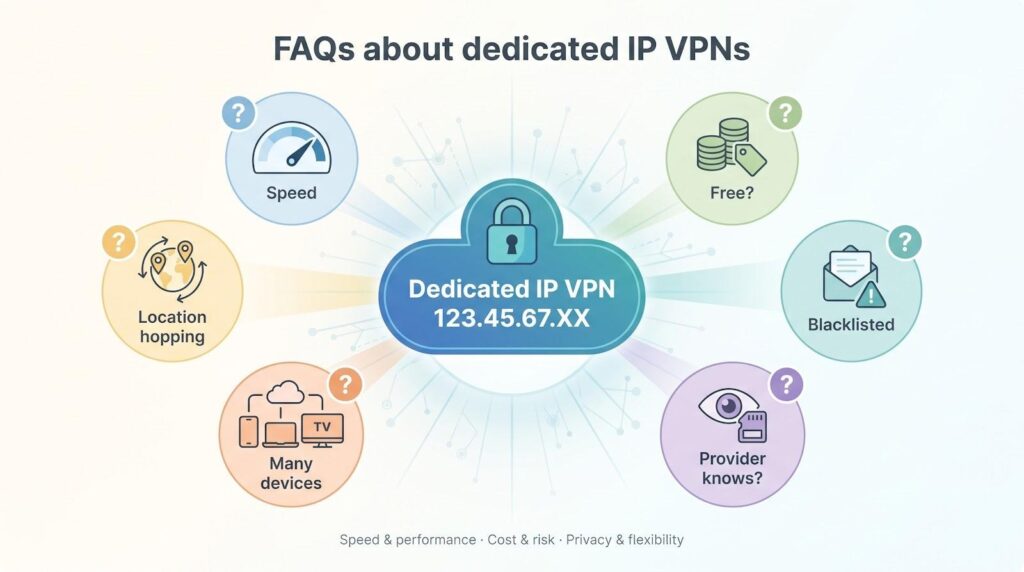
Is a dedicated IP faster than a shared VPN server?
Not inherently. Speed depends on network capacity, not exclusivity. Dedicated servers often see lighter traffic, so you may notice steadier throughput and fewer surprise slowdowns.
Can I get a dedicated IP for free?
No reputable provider offers a one-user IP address at zero cost. Maintaining an exclusive address has real overhead, so “free static IP” offers usually hide data harvesting or aggressive upsells. Approach them with caution.
What happens if my dedicated IP gets blacklisted?
It is rare, but streaming platforms sometimes flag entire data-center ranges. Most VPNs will issue a new IP if you provide evidence of a block, though policies differ. Review the refund or replacement terms before you buy.
Will my VPN provider know the IP is mine?
It depends. NordVPN currently links the IP to your account, while PIA and CyberGhost use blind tokens so even staff cannot map the address to a user. If maximum privacy is critical, choose a token-based system.
Can multiple devices use the same dedicated IP?
Yes. Once the IP is tied to your account or voucher code, any device logged in can connect to that server, subject to the provider’s simultaneous-connection limit.
Does a personal IP replace dynamic location hopping?
No. Treat it as an extra tool, not a restriction. You can still switch to shared servers whenever you need a different country or added anonymity.
Conclusion
If you need a whitelisted address for remote-work VPNs, self-hosting, or avoiding CAPTCHA roadblocks, a dedicated IP makes sense. If maximum anonymity and quick location changes rank higher, stay with the shared pool and accept the occasional hurdle.


