


7 Essential Plugins for Managing Financial Data on Your WordPress Site
Have a WordPress site for sales, coaching, or business scaling? You’re laying a sound foundation for long-term success and steady, passive income.
But with money constantly flowing in and out, your site is also handling a lot of sensitive financial data. Without a plan for managing that, you can encounter compliance issues, experience slow payouts, and continually require manual data processing.
A convenient solution? Plugins for managing financial data on WordPress.
You can use WordPress finance plugins to keep your financial data secure, organized, and easy to access.
Many of these tools function as full-fledged WordPress accounting plugins, helping you manage financial transactions, connect to bank accounts, and generate financial reports without relying on external finance software.
Let’s take a quick look at seven plugins that can help you manage important financial data on your WordPress site.
But first …
Evaluate Your Financial Data Needs
Grab a Google Doc or notepad and answer these questions to start:
- What kind of business are you running?
- Selling digital products like courses or downloads? Prioritize payment gateways, licensing controls, and detailed revenue reports.
- Selling physical products? In this case, you need accurate sales reports, tax automation, and inventory tracking. This often includes inventory management, transaction categories, and clear visibility into income vs. expenses across your store. Integrating this financial data directly with your shopping engine search reporting will give you a complete picture of your profit margins.
- Running a service-based biz? Think about automated invoices, recurring billing, and fast payment collection.
- Accepting donations or one-time payments? Simplicity, speed, and compliance are key here.
If you’re a coach juggling Stripe, Google Sheets, email reminders, and different types of charts, that’s manageable with three clients. But add 10 more, and it becomes chaos.
That’s why you need systems that scale.
Ask yourself:
- How do I collect payments? (e.g., via credit card, PayPal, bank transfers, etc.)
- Do I need to invoice clients monthly, bi-monthly, or weekly?
- Am I manually tracking income and expenses?
- What happens when it’s tax season?
- Do I have access to structured financial reports, such as income statements, balance sheets, or trial balances, when needed?
Answer those questions, and you’ll know exactly what kind of plugin setup supports your growth goals best. Speaking of which …
7 Plugins For Managing Financial Data on WordPress
Let’s review the real difference-makers. Here are some plugins that pull weight:
1. WP ERP: All-in-one financial, people, and business management for business owners (not hobbyists)
If your business is growing and you’re still using a spreadsheet system, stop.
WP ERP centralizes accounting, HR, payroll, and expenses. This is a great plugin if you’re managing a team. It’s also a plugin worth looking into if you handle business across different countries or manage many parts of a large organization.
Use this if you need to:
- Reconcile accounts directly from the dashboard
- Track expenses with tags and categories
- Manage employee leave and attendance
- Pay employees and contractors

Imagine saving 40 hours a quarter by ditching manual payroll. That’s a full workweek you can put back into strategy, not spreadsheets.
2. WooCommerce for e-commerce transactions and revenue tracking
If you’re selling anything online, especially physical products, WooCommerce can give you a scalable foundation.
It can handle:
- Payment gateways (like Stripe, PayPal, or bank transfers)
- Conversion and order data tied to revenue
- Real-time product performance
- Tax calculation by region
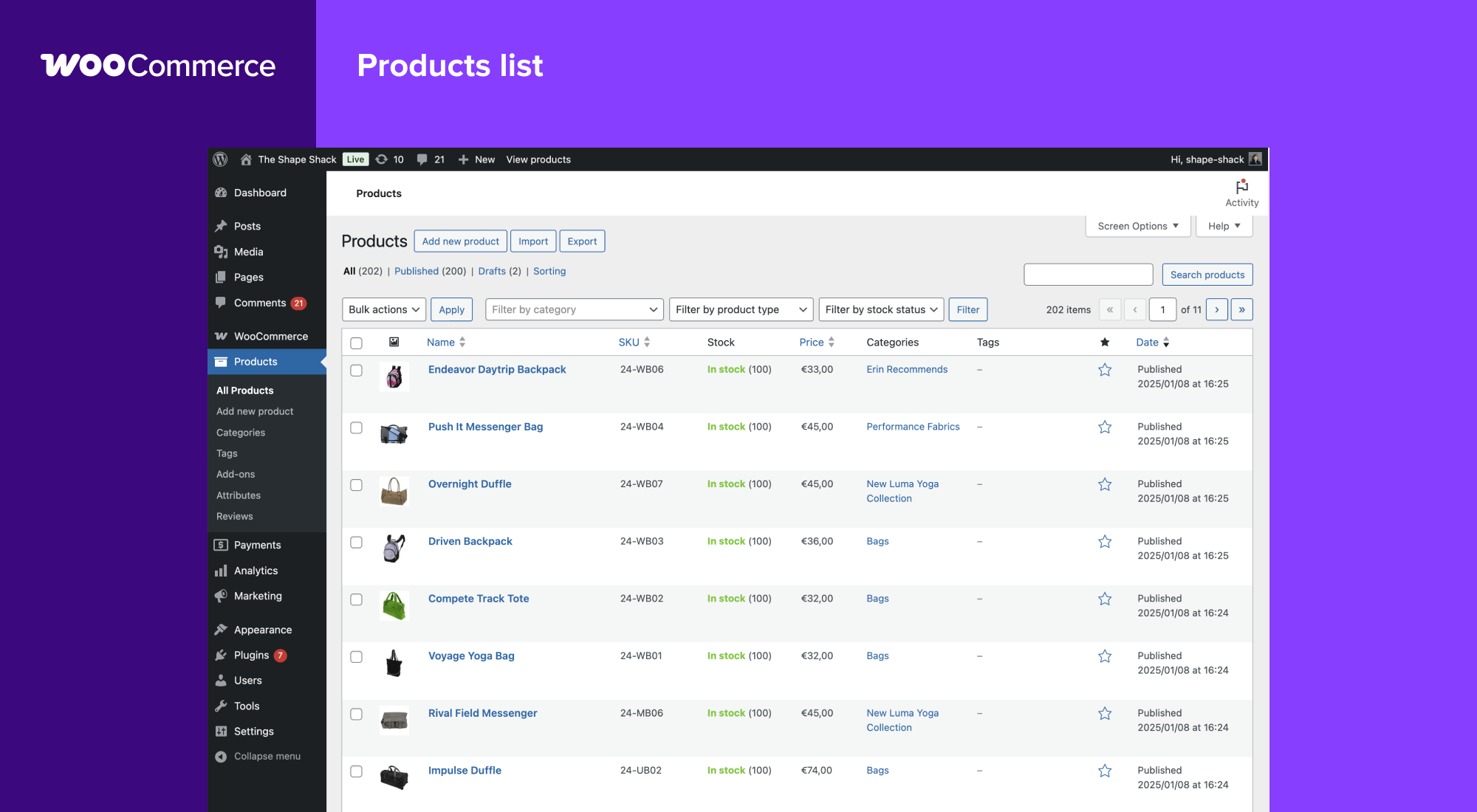
WooCommerce also integrates with accounting plugins and CRMs, so you can go beyond basic order tracking. You can connect each sale to customer profiles, segment by behavior or purchase history, and calculate profit margins per product or campaign.
For example, a candle shop could track seasonal product trends, identify high-value buyers, and forecast inventory, all from the same dashboard.
3. QuickBooks for WooCommerce, a seamless accounting sync
Manual data entry is a silent killer in any business. One mistyped number and your books are off, your taxes are wrong, and your accountant is raising their eyebrows.
QuickBooks for WooCommerce eliminates that.
It syncs:
- Discounts
- Shipping
- Refunds
- Sales
- Taxes
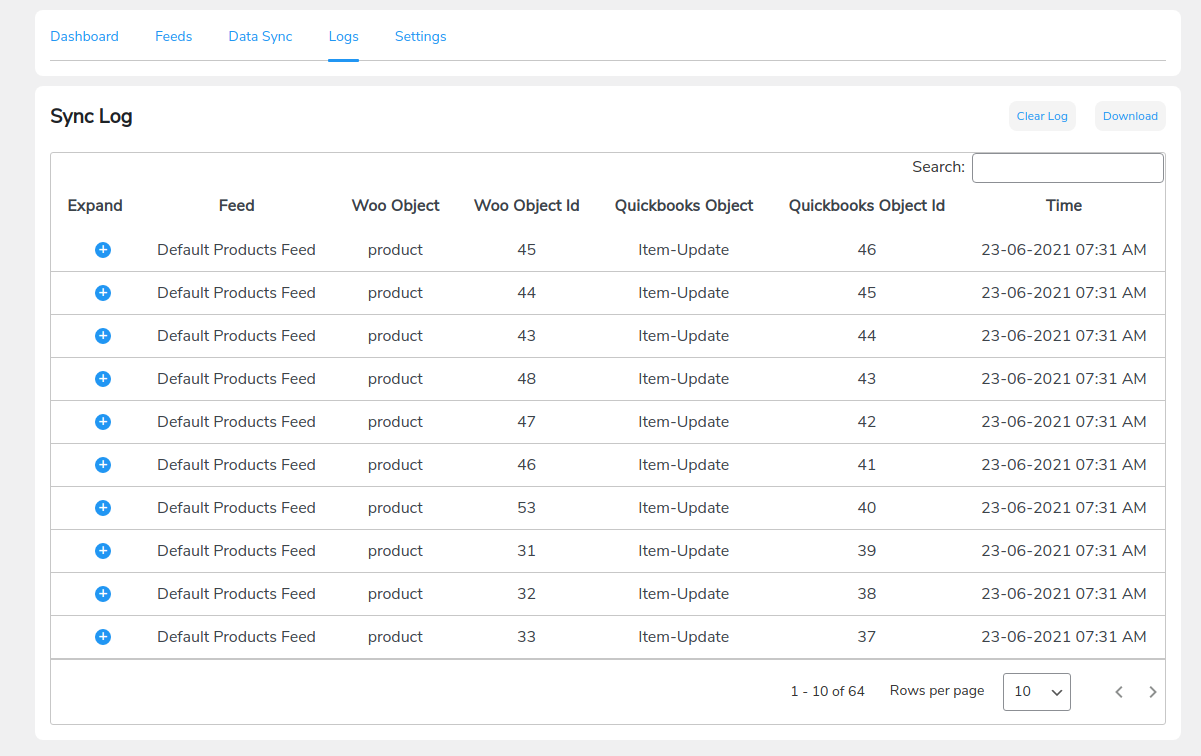
This plugin is a must if you want clean books, faster reporting, and accurate tax filing.
In fact, one reviewer said: “Absolute lifesaver. All orders go straight into QuickBooks Online as sales invoices — no more manual keying in details. Fantastic!! Highly recommend.”
4. Sliced Invoices for professional invoicing and billing
Need to invoice clients? Then you need more than a PDF template and a hopeful email.
Sliced Invoices gives you:
- Payment tracking and overdue flags
- Recurring invoices on autopilot
- Quotes that convert to invoices
- Branded invoice templates
For consultants and creatives, this saves you time and helps you look like a pro. Most importantly, it keeps cash flowing and enables you to skip the awkward “did you get my invoice?” convo.
Set it up once, and it’ll run your billing behind the scenes.
5. WP Simple Pay for lightweight payment collection
Selling a digital product? Hosting a paid webinar on today’s home interest rates? No need to overbuild.
Instead, use a plugin like WP Simple Pay for:
- One-click checkout experiences (no shopping cart required)
- Stripe-powered forms
- Mobile-ready designs
- Global payments
A health coach who I worked with set this up in an afternoon. Clients pay through a link; she gets paid instantly. Nobody has to fumble with checks or clunky apps.

If you’re offering flat-fee services or accepting donations, this plugin is lean, clean, and effective.
6. Sprout Invoices for full-featured invoicing and payment tracking
Sprout goes deeper than Sliced Invoices. Photographers, agencies, and event planners love this plugin because it mirrors how they actually get paid … in chunks, over time.
With Sprout Invoices, you get:
- Payment schedules (perfect for deposits + milestone payments)
- Estimates that convert to invoices
- Time tracking add-ons
- Payment reminders
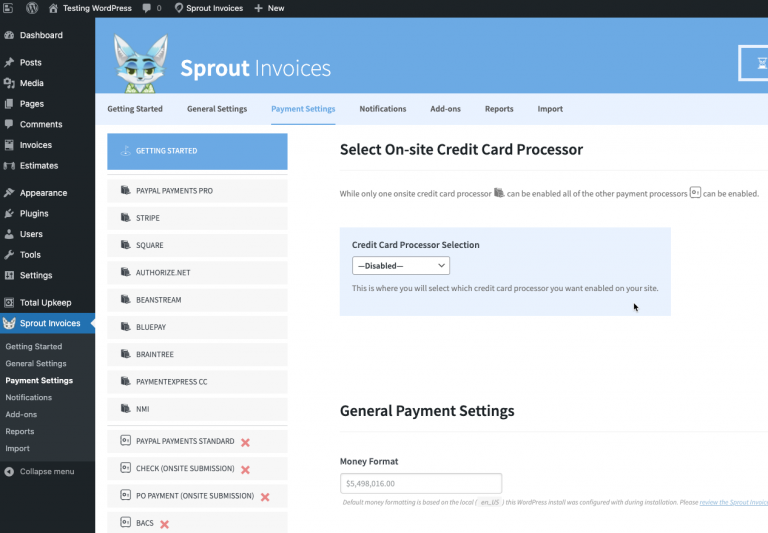
A videographer I know uses it to collect deposits upfront, bill by phase, and gently follow up if payments slip. This makes it a great tool for both invoicing and cash flow management.
7. Jetpack CRM for customer and transaction management
Financial data without context is noise. Jetpack CRM turns your financial data into insight, so you can see the full customer journey, not just the numbers. This plugin is especially helpful if you’re managing dozens or hundreds of clients.
With Jetpack CRM, you get:
- A clear view of customer value and sales activity
- Quotes, invoices, and payments in one place
- WooCommerce and Stripe integration
- Contact records linked to sales
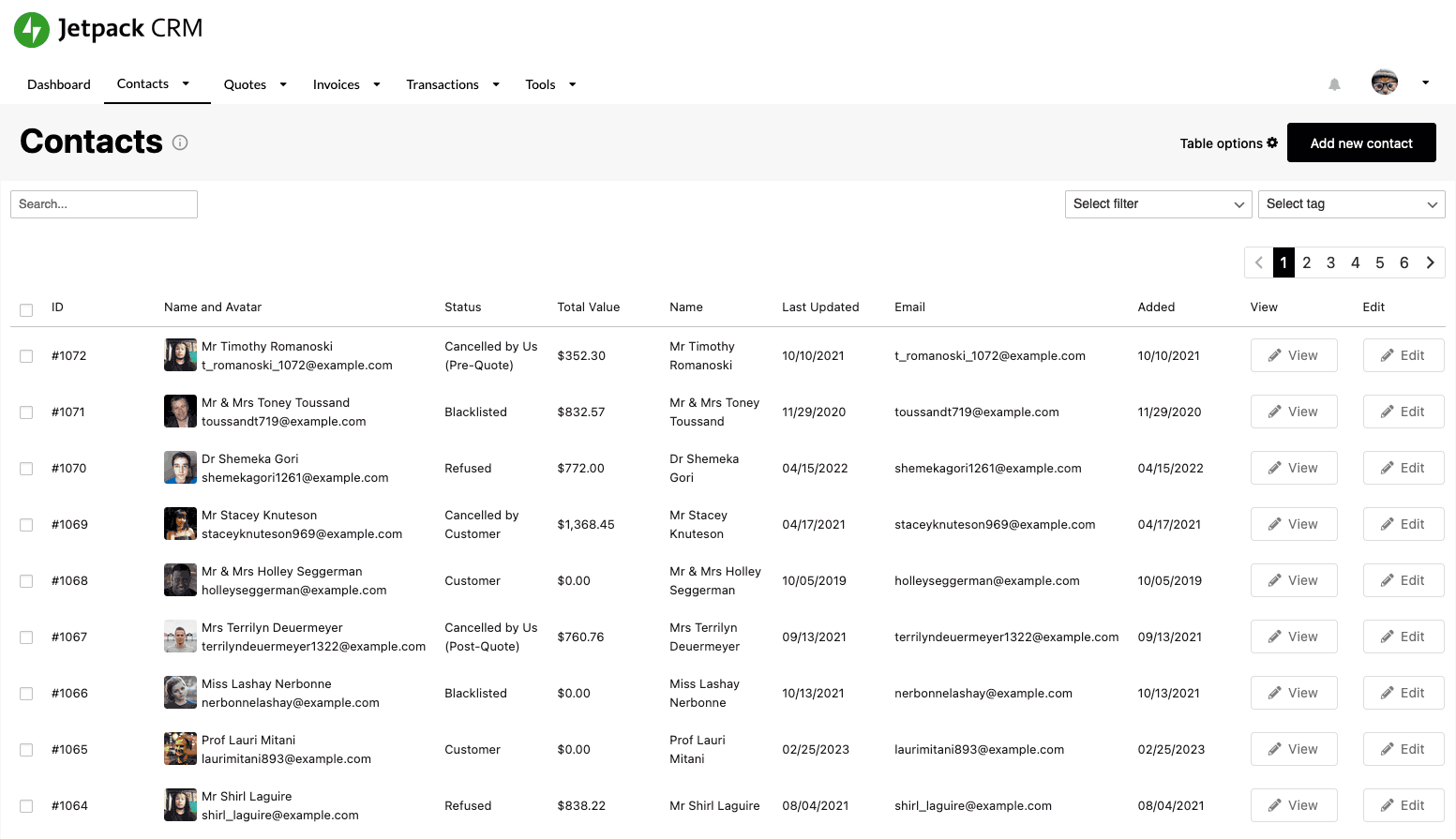
If you have a large number of clients, this helps keep your pipeline tight. Use it to segment VIP clients, track your upsells, and keep tabs on unpaid invoices.
Think of it as your financial dashboard with relationship intelligence baked in.
Why These Plugins Matter
Saving time is great. But an obsession with efficiency is old news. Going forward, business owners need to focus on building something steady and resilient.
Thankfully, when you stack the right tools, you can scale without breaking.
You can:
- Gain real-time visibility (see trends before they become problems)
- Reclaim hours every month (and redirect them toward growth)
- Reduce human error (no more “oops, missed that invoice”)
- Stay compliant, tax-ready, and less anxious
Your time is too valuable to spend double-entering payments or chasing down lost receipts. Utilize the WordPress finance plugins we mentioned above to alleviate the mental strain and streamline your operations.
10 Actionable Steps to Implement These Plugins Effectively
Let’s go beyond install-and-hope.
Here’s how to turn your WordPress finance plugins into a real system.
- Audit your needs: Write down your top three time-wasters or financial pain points.
- Start simple with WP Simple Pay: Need fast payments with no fuss? Start here.
- Run WooCommerce + QuickBooks together: Automate store-to-books handoff.
- Set up recurring billing with Sliced or Sprout Invoices: Keep client cash flow steady.
- Use WP ERP to track expenses and reconcile monthly: Don’t guess what you spent.
- Review reports weekly in QuickBooks or WP ERP. Use this to spot patterns faster.
- Turn on late payment alerts + auto-fees: Stop waiting and start getting paid on time.
- Upload receipts daily or use a scanner tool: Reduce tax-season panic.
- Enable live cash flow tracking: Plugins that sync with WP ERP are gold here.
- Secure your setup: SSL, Stripe/PayPal gateways, and a solid backup plan are non-negotiable. Test everything before officially using it.
Additional tips for bulletproof financial management
Be sure to also keep these important tips in mind. 👇
- Security first: Only use plugins from trusted developers. Plugins that handle financial data should be supported by tools and processes that run cloud security assessments to keep sensitive financial data protected as your site grows.
- Avoid overlap: Too many plugins that “sort of” do the same thing slow your site and create confusion. Make sure you’re choosing ones you really need.
- Be audit-ready: Plugins like QuickBooks log every transaction so you can be ready for tax season.
- Back up daily: If your site crashes or gets hacked, a backup can preserve your entire financial history.
Think of your plugin stack as your virtual CFO. Get it right, and you’ll spend less time buried in numbers and more time making strategic moves.
Wrap Up
Most WordPress sites reach a point where spreadsheets and disconnected tools create more friction than clarity.
However, with the right WordPress plugins for managing financial data, your site can also serve as a robust financial system.
With plugins that fit your needs and goals, you can:
- Track income and expenses in real time
- Manage your cash flow with confidence
- Stay ready for tax season and audits
- Send professional, branded invoices
- Understand what’s helping you grow
- Collect payments without friction
Start by tackling your biggest pain point (whether it’s late payments, messy records, or time-consuming manual entry). Then build from there. And let your system work for you while you sleep. 🙂


- How Can Web and App Development Services Help a Business Grow Online?

- Security Guard Company Houston TX: How to Choose the Right Security Service

- Xuebaotou Signature Dishes: Exploring Traditional Flavors and Culinary Heritage

- Swapping Placeholder Text for a Massive SEO Matrix
- Design.com Review (2026): Is It Worth It? Features, Pricing and Benefits
