


How AI Agents Turn WordPress Into an Intelligent Automation Engine
Running a WordPress site feels like handling a hundred tasks at once. Customer support tickets pile up. Product descriptions need writing. Order confirmations sit unsent. Every single task demands your attention, pulling you away from what actually grows your business.
You know automation could help, but most tools just create more problems. They nickel and dime you with per-task fees. They force your data onto external servers you don’t control. They promise simplicity but deliver confusion instead.
What if your WordPress site could actually think for itself? Not just follow rigid rules, but understand context, make smart decisions, and take action without your constant oversight.
That possibility just became real. AI agent for WordPress has arrived, and it’s fundamentally changing what automation means.
How Traditional WordPress Automation Handled Tasks
Traditional automation plugins handle simple tasks well enough. A form gets submitted, and an email goes out. A product sells, a notification fires. These one-step automations work fine when your needs stay basic.
But watch what happens when you need something more nuanced. You want to look at customer messages and deal with urgent problems in a different way. You need to write different product descriptions for each item based on its features and the brand’s voice. You want follow-ups that are tailored to each customer.
All of a sudden, those easy-to-use automation tools can’t keep up. You keep making your conditional logic more complex, handling dozens of if-then statements, and still not getting it right. The automation becomes harder to maintain than doing the work manually.
External platforms like Zapier and Make promise relief. Then the monthly bills arrive. You pay for every single task. A busy month means a shocking invoice. Plus, your data travels through their servers, adding latency and raising privacy concerns.
WordPress site owners needed something different. Something that could handle complex decisions without rigid programming. Something that stayed on your server and didn’t charge per action. Something actually intelligent.
How AI Agents Elevate WordPress Automation Beyond Simple Tasks
An AI agent for WordPress goes far beyond simple automation. Think of it as the difference between a vending machine and a personal assistant.
A vending machine follows exact instructions. You press button C4, and you get your chips. Every time. No variation. No thought. Traditional automation works the same way. It executes precisely what you programmed, nothing more.
A personal assistant understands your goals. They know your preferences. They figure out the best approach for each situation. They handle unexpected issues. They remember past conversations. They adapt.
An AI agent in WordPress adds that level of intelligence to your automation. They can look at incoming data, figure out what it means and what the person wants, make decisions, remember important information, and connect several actions to reach a goal.
This is what makes it so useful for WordPress. When a customer fills out a support form, an AI agent can read the message, figure out how urgent it is, look up information about the order, write an appropriate response, send it to the right team member, and follow up later if necessary. All by itself.
No rigid programming required. No endless conditional statements. The agent understands what you want to achieve and figures out how to get there.
How Bit Flows Brought True AI Agents to WordPress
Bit Flows started as a robust multi-step workflow automation plugin for WordPress. It gave site owners a visual builder, extensive integrations, and the power to create complex workflows without code. Users could connect forms to CRMs, sync WooCommerce orders to Google Sheets, and build multi-step automations that actually worked.
Then the developer team pushed further. They asked a crucial question: what if workflows could think?
The result is the first native AI agent in WordPress. Not a bolt-on integration with an external service. Not a wrapper around an API. A real, thinking automation layer that lives inside your WordPress installation.
This AI agent works within Bit Flows’ visual workflow builder. You set up triggers like you always have. Form submissions, new orders, scheduled times, webhooks. But then you add an AI agent node that changes everything.
The agent connects to leading AI models, including OpenAI Chat Model, Deepseek Chat Model, Groq Chat Model, and others. You tell it what you want to accomplish, not exactly how to do it. The agent figures out the details.
Want to analyze customer sentiment and route messages accordingly? Describe that goal. The agent handles the analysis, interprets the results, and triggers the right actions. Need to generate content that matches your brand voice? Give it examples. The agent learns your style and produces consistent output.
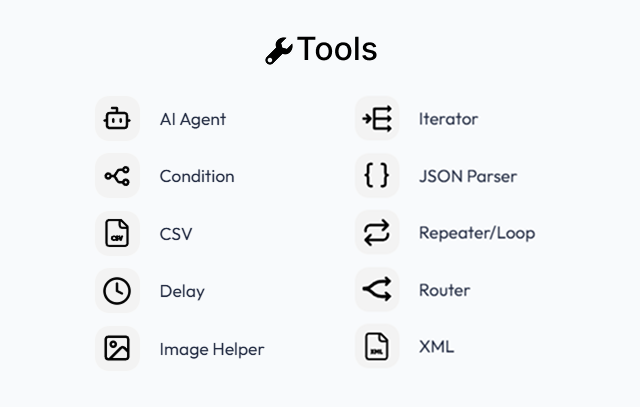
The magic happens in how everything connects. The AI agent doesn’t work in isolation. It taps into Bit Flows’ entire ecosystem. Over 250 integrations with WordPress, WooCommerce, popular form builders, CRMs, email platforms, spreadsheets, and more. Plus tools like routers, conditions, delays, iterators, XML, CSV, repeater, image helper, and JSON parsers.
Your AI agent can pull data from anywhere, process it intelligently, and push results wherever they need to go. All while running on your own server, keeping your data completely private, and handling unlimited tasks without per-action fees.
The Architecture That Makes WordPress Intelligent
Understanding how AI agent in WordPress work inside Bit Flows helps you grasp their full potential.
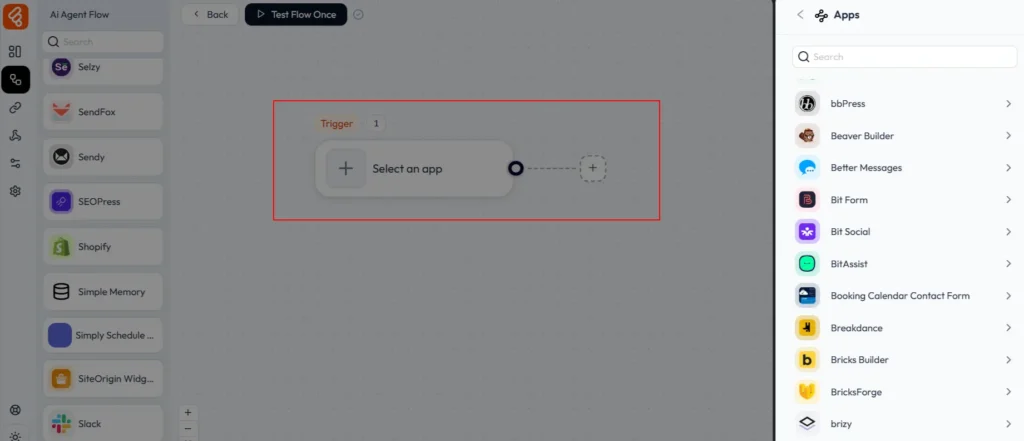
Everything starts with a trigger. Something happens on your site. A customer fills out a contact form. An order gets placed in WooCommerce. A new user registers. A scheduled time arrives. Any of these events can kick off an agentic workflow.
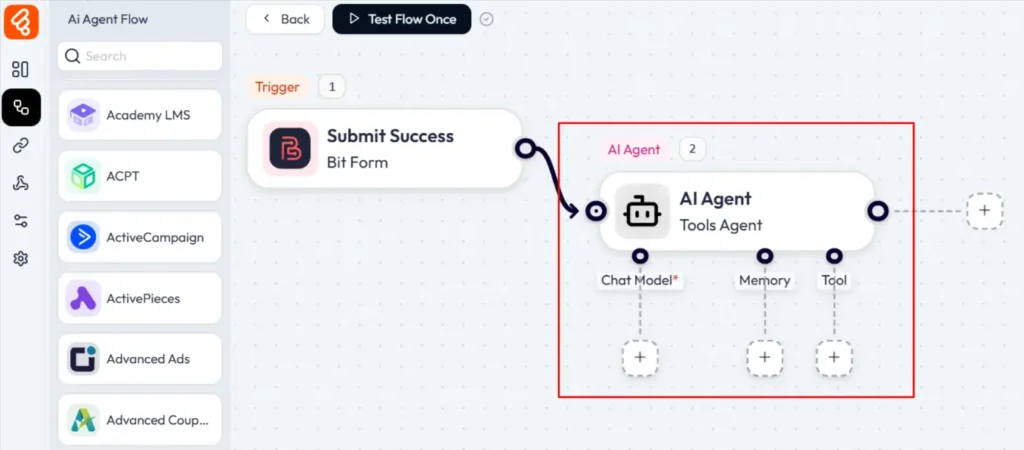
That trigger sends data into the AI agent node. This is where the intelligence lives. The agent uses what’s called an LLM chain, essentially a series of prompts that guide the AI model through reasoning about the situation.
You set up these prompts to tell the agent what to do. For example, you could tell it to look at customer messages and figure out how urgent they are, how they feel, and what they’re about. Or to write product descriptions that focus on benefits instead of features. Or to make reports that are easy to read from the order data.
Memory is another thing that the AI agent uses. Simple memory lets the agent remember and store information from one step of a workflow to the next. It might remember the name of a customer, their order history, or the context of a previous conversation. This memory helps the agent make better decisions and gives its outputs a more personal touch.
Based on its analysis, the agent can invoke tools. In Bit Flows, tools are actions the agent can take. Sending emails. Creating WordPress posts. Updating WooCommerce products. Posting to Slack or Telegram. Adding rows to Google Sheets. The agent decides which tools to use and what data to send them.
Finally, actions are executed. The agent has made its decisions, set its flags, and determined the path. Now the selected actions run. Emails go out. Records update. Notifications fire. All automatically, based on intelligent analysis rather than rigid rules.
The entire process happens asynchronously in the background. Your site’s performance stays smooth. Visitors experience no delays. The automation churns away behind the scenes, processing tasks as they arrive.
How AI Agents Transform WordPress Operations: Workflow Examples
Let’s look at specific ways AI agents transform WordPress operations across different categories.
AI-Driven Customer Support That Actually Helps
Support tickets drain time and energy. Customers need quick responses. But each message requires reading, understanding, researching, and crafting appropriate replies. The workload never ends.
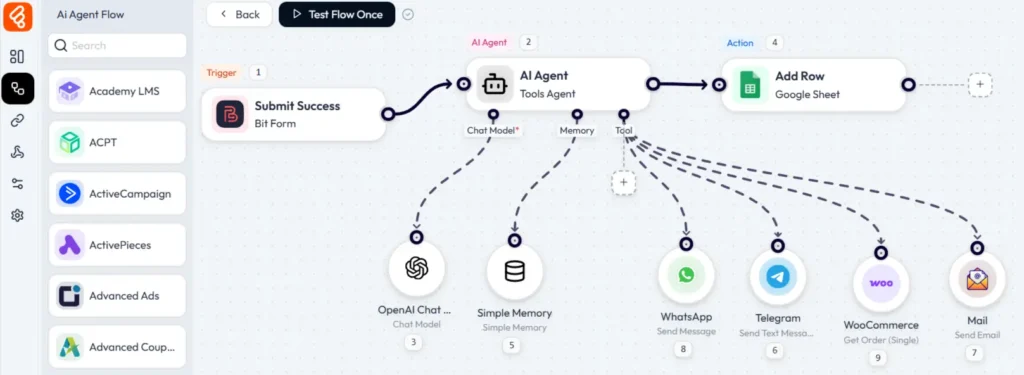
An AI agent changes this completely. When a customer submits a support form, the agent reads the message and determines intent. Are they asking about shipping? Requesting a refund? Reporting a bug? The agent categorizes automatically.
Next, it checks relevant information. For shipping questions, it pulls order status from WooCommerce. For product questions, it references your documentation. For account issues, it looks up the user history.
The agent then generates a personalized response. Not a generic template. A message tailored to this specific customer and situation. It might include their order number, estimated delivery date, and a direct answer to their question.
If the issue requires human attention, the agent routes it to the right team member with full context attached.
AI-Powered Content Creation at Scale
Content fuels online business. Blog posts drive SEO traffic. Product descriptions convert browsers into buyers. Social media updates maintain engagement. But creating all this content manually takes forever.
AI agents make content creation sustainable. For blog posts, you can trigger an agent with just a topic via Google Sheets. The agent researches using web search capabilities, outlines the structure, writes the draft, adds SEO metadata, and publishes on schedule. You review and refine, but the heavy lifting is done.

Product descriptions become even more powerful. When you add a new WooCommerce product, the agent can analyze the product name, category, attributes, and images. It generates a description that highlights benefits, matches your brand voice, includes relevant keywords, and speaks directly to your target customer. Also agent can create and publish an announcement post of the product.
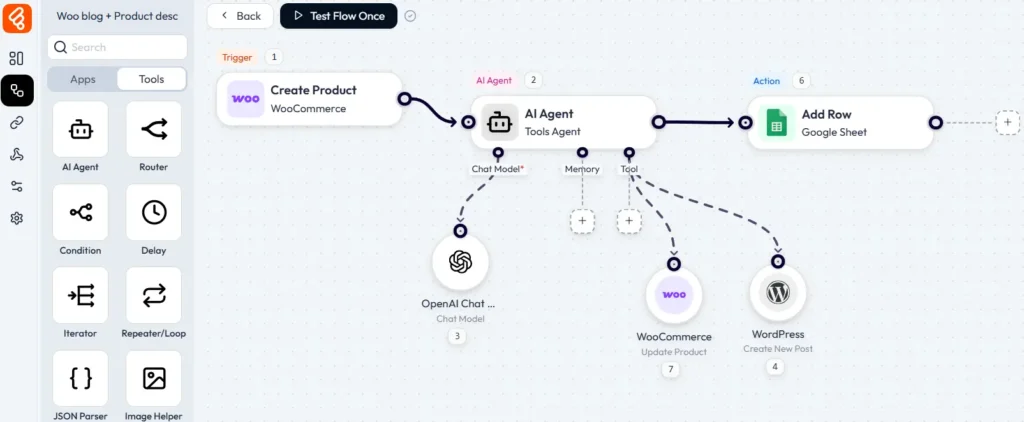
Need dozens of descriptions at once? Upload a CSV with product details using a form builder. Use Bit Flows’ iterator tool to loop through each row. The agent processes them one by one, generating unique, compelling copy for every single product.
You can apply the same approach to email campaigns, post updates, and more. The agent maintains consistency while adapting each piece to its specific purpose.
AI-Driven E-commerce Intelligence
WooCommerce stores generate constant data. Orders, customers, inventory, reviews. Managing it all manually means opportunities slip through. AI agents turn data into action.
When high-value orders come through, the agent can tag those customers as VIP in your CRM, send a personal thank-you message, and flag their accounts for priority support. All automatically, the moment the order processes.
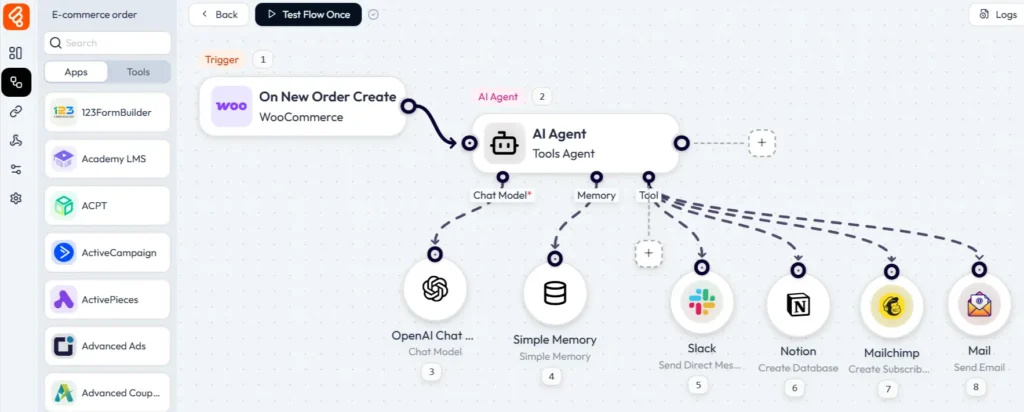
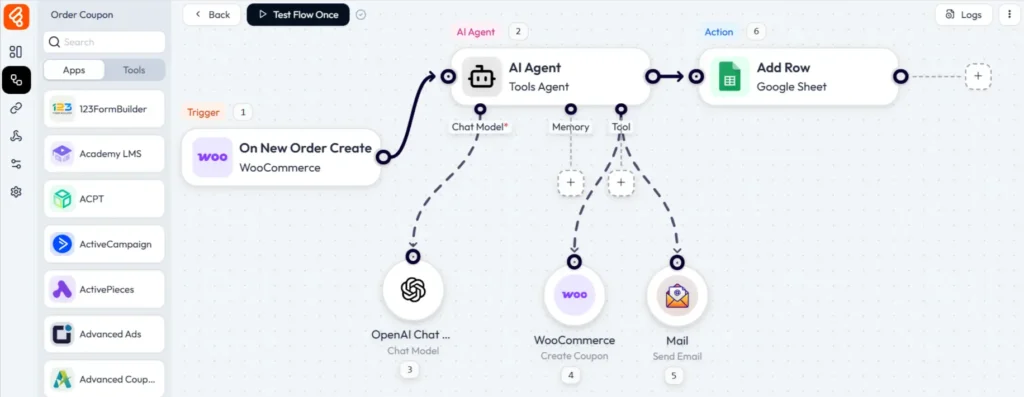
You can also create a coupon based on the order total. Then update the coupon on the WooCommerce Coupon list and send a personalized mail with the coupon code to the customer.
Lead Generation & CRM Management
Lead forms capture potential customers, but converting them requires quick, relevant follow-up. Most businesses struggle with this. Leads sit in inboxes. Responses take hours or days. Opportunities cool off.
AI agents solve this. When someone fills out a lead form, the agent analyzes their information and expresses interest. It scores the lead based on fit and urgency. High-potential leads get immediate attention.
The agent sends a personalized response within seconds. Not a canned “thanks for your interest” message. A reply that addresses what they asked, provides helpful resources, and suggests next steps.
It adds the lead to your CRM with proper tagging and segmentation. It schedules follow-up tasks for your sales team. It might even trigger a nurture sequence tailored to their specific interests.
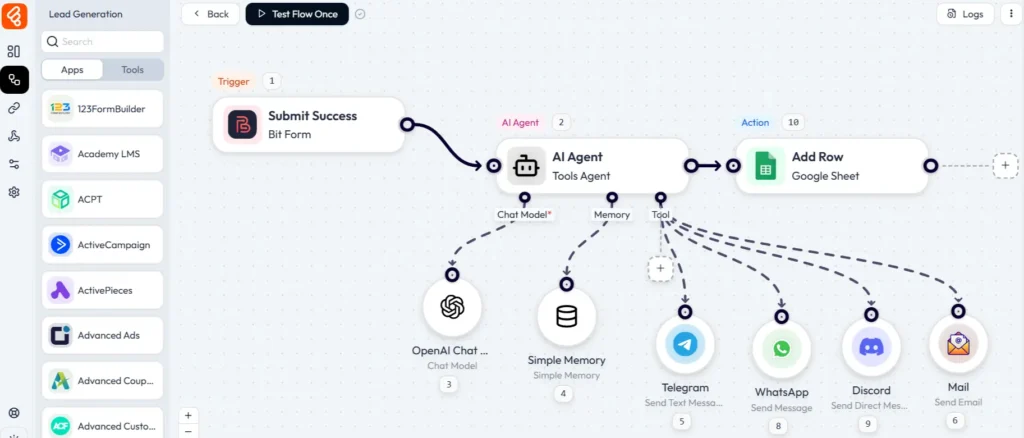
Throughout the process, the agent tracks engagement. Opens, clicks, replies. It adjusts the approach based on the response. Some leads need space, others want immediate contact. The agent adapts automatically.
More Possibilities With AI Agents
The support triage example barely scratches the surface. AI agents can transform nearly every aspect of WordPress operations.
For content publishers, agents can monitor RSS feeds or topic keywords, generate article ideas based on trending searches, write draft posts with proper structure and SEO, schedule publishing at optimal times, and share to social media with platform-specific captions.
For membership sites, agents can onboard new members with personalized welcome sequences, analyze engagement patterns and recommend content, detect inactive members and trigger re-engagement campaigns, generate progress reports for users, and moderate community submissions automatically.
For educational platforms, agents can answer student questions using course content, grade certain assignment types automatically, provide personalized study recommendations, track progress and identify struggling students, and generate lesson summaries and study guides.
For service businesses, agents can qualify incoming leads based on criteria, schedule appointments accounting for availability, send appointment reminders and follow-ups, collect feedback after service delivery, and identify upsell opportunities from interaction history.
The common thread is intelligence. These aren’t rigid automations following fixed paths. They’re adaptive systems that understand context, make judgment calls, and take appropriate action.
Performance and Privacy Matter
Running AI agents on your WordPress site raises natural questions about performance and security. Bit Flows addresses both thoughtfully.
All workflow execution happens asynchronously in the background. When a trigger fires, Bit Flows queues the task and processes it separately from page requests. Your site stays fast for visitors while automations run behind the scenes.
The plugin manages resources efficiently. Workflows process one at a time to avoid overwhelming your server. Failed tasks retry with exponential backoff. Logging is detailed but optimized for storage.
For sites with heavy automation needs, you can optimize further. Run workflows on a schedule rather than in real-time. Batch process tasks during off-peak hours. Use caching for frequently accessed data. Upgrade to a VPS or dedicated server for maximum performance.
Security follows WordPress best practices. API keys are stored encrypted in your database. Only administrators can access Bit Flows settings. Workflow execution logs help audit what happened and when. Input validation prevents injection attacks.
Most importantly, your data stays on your server. When you use external AI APIs, only the specific content you send leaves your system. Customer records, order details, and other sensitive information remain in your WordPress database unless you explicitly configure actions to send them elsewhere.
This self-hosted approach gives you complete control. No third-party service has access to your full database. No external automation platform sees your customer information. You comply with privacy regulations because you know exactly where data flows.
The True Cost of AI Agents in WordPress Automation
Automation platforms traditionally charge per task. Run 1,000 workflows a month, pay for 1,000 tasks. Scale up, costs scale proportionally. This model makes growth expensive.
Bit Flows takes a different approach. The core plugin is completely free. You can download it from the WordPress plugin directory, install it on unlimited sites, create unlimited workflows, and run unlimited tasks. Forever. No hidden fees. No task limits. No surprise bills.
The only costs you’ll encounter are API fees for AI models. OpenAI, Google, Anthropic, and others charge based on tokens processed. A typical workflow might cost fractions of a cent to run. Even heavy users spend just a few dollars monthly.
For premium features and integrations, Bit Flows offers a Pro version with lifetime pricing. Pay once, use forever. No subscriptions. No recurring charges. You own the software outright.
Compare this to Zapier, where 1,500 tasks monthly costs $39 and scales up quickly. Or Make.com, where similar usage runs $10 to $30 monthly. With Bit Flows, you’d pay nothing beyond minimal AI API costs.
The math becomes obvious at scale. A busy WooCommerce store might run 10,000 automations monthly. On Zapier, that’s $100+ every single month, forever. With Bit Flows, it’s a one-time purchase plus pennies in API fees.
Conclusion: Your WordPress Site Deserves Intelligence
The gap between what WordPress sites could do and what they actually do has been frustrating. You knew automation could help, but the tools were expensive, inflexible, or both.
AI agents change the equation completely. Your site can now handle complex tasks that previously required human judgment. It can adapt to situations instead of breaking when things don’t match expectations. It can work continuously in the background, never tired, never distracted.
Bit Flows makes this accessible right now. No waiting for future updates. No expensive enterprise platforms. Just a free WordPress plugin that brings real AI agent capabilities to your site.
The workflows you build today will save hours tomorrow. And the day after. And every day going forward. That time compounds. You redirect it toward activities that actually grow your business.
Customer experience improves because responses come faster and match actual needs. Content quality increases because AI helps you maintain consistency at scale. Operations run more smoothly because intelligent automation catches issues before they become problems.
WordPress started as a simple blogging platform. It evolved into a complete website system. Now it’s becoming an intelligent automation engine. Your site isn’t just publishing content or processing orders anymore. It’s thinking, deciding, and acting on your behalf.
The question isn’t whether to adopt AI agents. The question is how quickly you want to start benefiting from them.
FAQ’s
AI agents are intelligent automation tools that make decisions, process data, and take actions based on context, all within your WordPress site.
Bit Flows AI Agent runs entirely within your WordPress site, keeping your data private, speeding up execution, and eliminating per-task fees. The AI agent integrates directly with WordPress, WooCommerce, and popular plugins for deeper functionality than external tools.
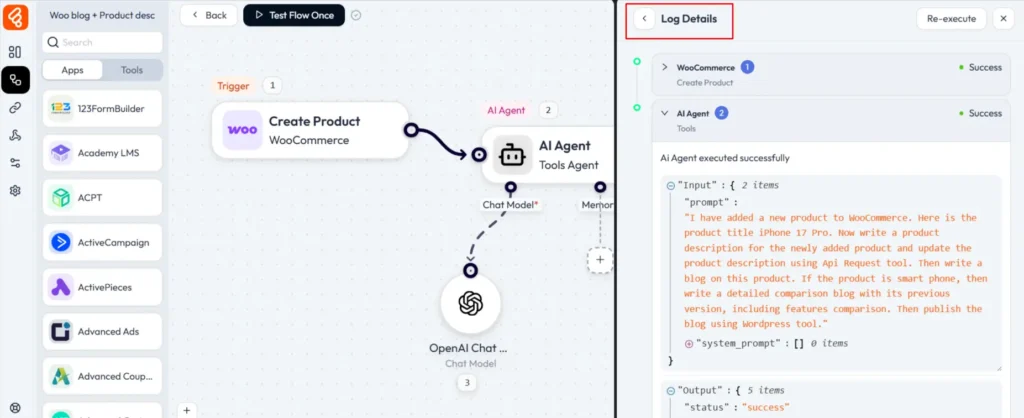
Bit Flows provides detailed execution logs for every workflow run. You can see exactly what data the agent received, how it analyzed that data, what conclusions it reached, and what actions it triggered. This transparency lets you verify decisions and refine prompts if needed.
Bit Flows sends email notifications whenever workflow steps fail. You receive immediate alerts rather than discovering problems days later. The execution logs show exactly what went wrong, and you can also re-execute failed workflows directly from the logs once you fix the issue.
No, Bit Flows is a no-code solution, making it easy to set up AI agents without any technical knowledge.


