


Bit Social: The WordPress Social Media Automation Plugin
Managing social media feels overwhelming when you’re running a WordPress site, too. You write great content, hit publish, then spend hours copying and pasting to Facebook, LinkedIn, Twitter, and more. Each platform demands different content formats and has its own peak engagement hours. That manual work never ends.
If you’re thinking about using those fancy social media automation tools. Stop there! Most are expensive. Also, many have confusing setups.
However, Bit Social is totally fuss-free. It is one of the best social auto poster and scheduler plugins under $100.
It directly connects your social media accounts to your WordPress site and shares your content automatically. You get exciting automation features like auto-posting, smart scheduling, and instant sharing across 13+ social platforms. This plugin saves hours every week and helps maintain a consistent social media presence.
What is Bit Social?
Want to know what exactly this plugin does? Imagine you just published a blog post. And that very moment, your content gets shared across all your social media accounts. Bit Social makes this happen automatically.
It is an affordable social media auto poster and scheduler plugin built for WordPress. It connects your website to popular social platforms. When you publish content in WordPress, Bit Social shares it everywhere you want.
The plugin lives inside your WordPress site. You control everything from one dashboard. You don’t need to jump between platforms. Everything happens in one place.
Let’s explore what makes Bit Social powerful for bloggers and social media managers:
Two Simple Connection Methods
Bit Social offers two ways to connect your social accounts. Pick the method that fits your needs.
One Click Connect
This is the fastest option. Click once, and you’re connected. Enter your login credentials and start posting immediately. No technical setup required. Perfect for beginners who want to get started quickly.
Custom App Method
This gives you more control. Create your own custom app with your credentials. Manage everything with precision. Great for advanced users who want full control over their social media posting.
This quick setup makes it an easy-to-use social media plugin for busy users.
Auto Post Feature That Works Like Magic
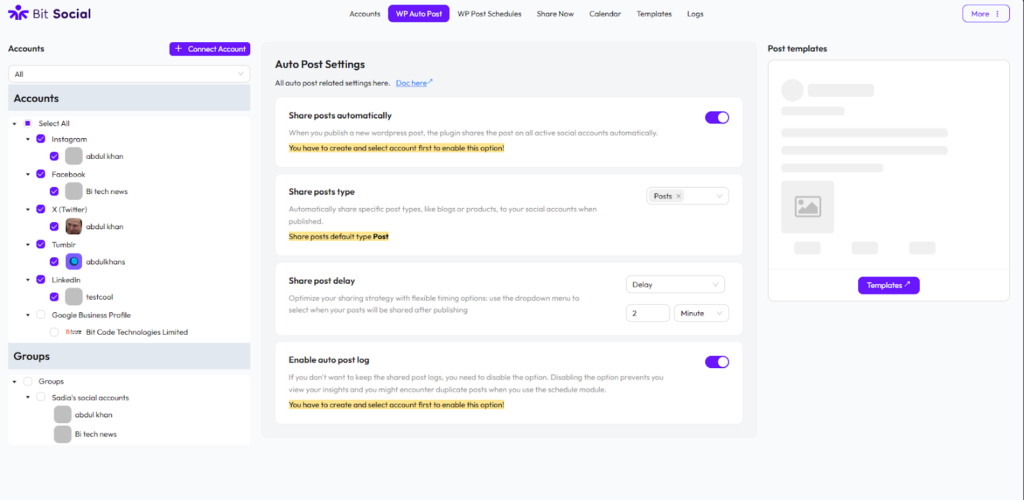
The auto-post feature saves the most time. You simply need to connect your social accounts with the plugin. When you publish a WordPress post, Bit Social springs into action. As I said before, it shares your content across all connected platforms automatically.
You write once and hit publish once. Your WordPress post gets shared on all the connected platforms at the same time. No manual work required. No copying and pasting. Just pure automation.
The plugin supports unlimited auto-posting. Publish as many posts as you want. Share to as many accounts as you need. There are no limits or hidden charges.
Smart Post Scheduling with Filters
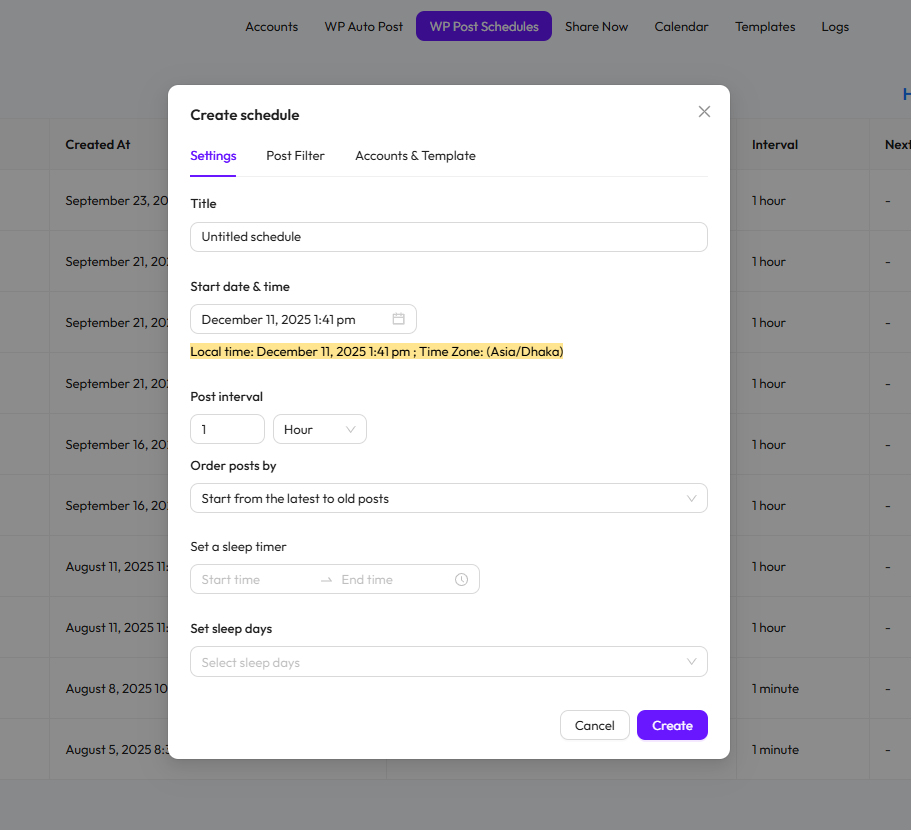
Sometimes you’ve a busy week or need more control over when your posts go live. Bit Social has a solution to this issue. It includes a powerful scheduling system. Pick the perfect time for maximum engagement and schedule your WordPress posts days or weeks in advance.
The post filter feature helps you target the right audience. You can filter posts by category, tags, or custom taxonomies and share specific content with specific followers. You don’t have to waste time posting irrelevant content to the wrong platform.
You can also filter by published date. This keeps your social feeds fresh and relevant.
Share Now for Instant Publishing
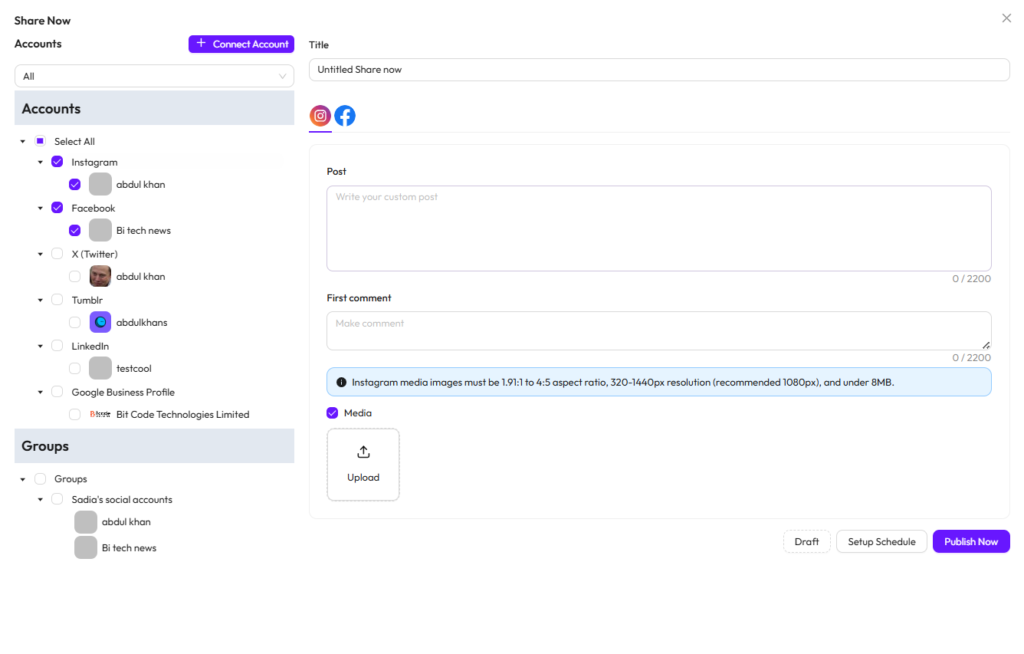
Need to share something right away? The Share Now feature handles instant posts. No need to create a WordPress post at first. Write a custom message with that, upload an image, or add a link. Share immediately across multiple platforms.
This works perfectly for time-sensitive announcements. For example, you have to launch a flash sale or want to share a big announcement. Everything goes live in seconds.
Visual Calendar for Easy Management
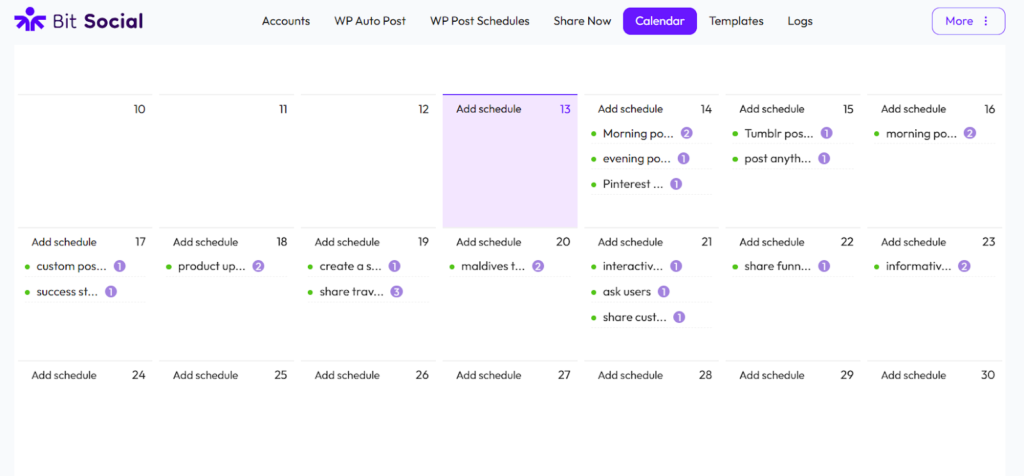
Bit Social includes a modern social media calendar. Here, you can view all your scheduled posts along with platforms where they are planned to be shared at a glance. You can also schedule multiple posts on the same day.
It gives you a clear view of what’s coming up next. You don’t have to juggle through spreadsheets. You can see gaps in your schedule. You can balance content across different platforms and stay organized.
Customizable Templates for Every Platform
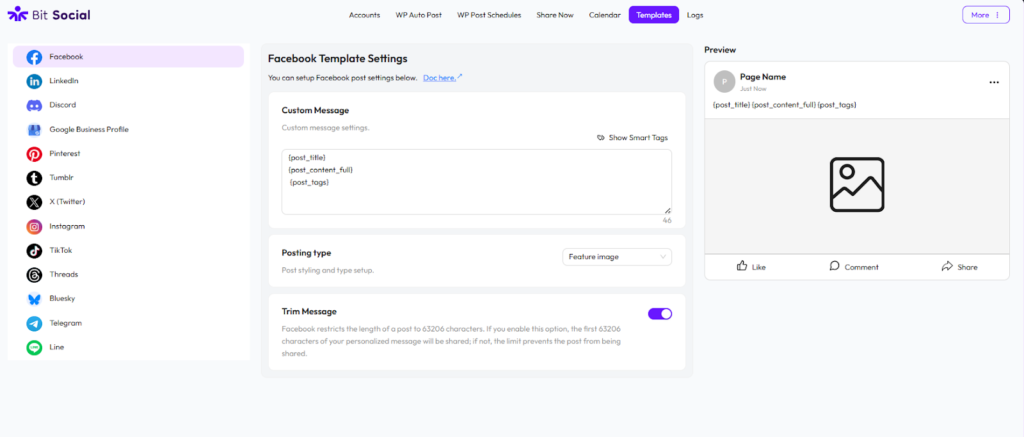
Every social platform has different requirements. Facebook posts look different from LinkedIn posts. Similarly, Twitter has character limits, and Instagram supports a specific image size.
Bit Social handles this with customizable templates. Create templates for different posting styles:
- With “Only Custom Message”, share only text without links or images.
- With “Link Card”, display rich previews with thumbnails.
- With “Featured Image”, publish your WordPress blog feature image with your post.

Use smart placeholders to customize each post. Insert post titles, excerpts, categories, tags, author names, and more. These tags fetch data from your blog, and everything updates automatically based on your WordPress content.
Support for 13+ Social Platforms
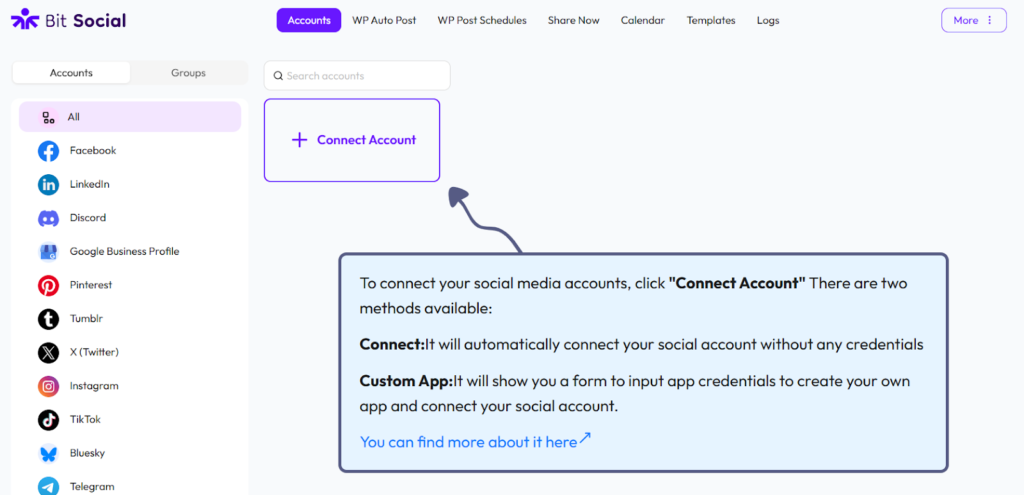
Bit Social connects to all major social media platforms:
Free Platforms:
- Facebook (profiles and pages)
- LinkedIn (profiles and company pages)
Pro Platforms:
- Twitter/X
- TikTok
- Google Business Profile
- Tumblr
- Discord
- Telegram
- Line
- Bluesky
- Threads
With more platforms, AI Agents are also coming soon. The team keeps adding new integrations based on user requests.
WooCommerce Integration for E-Commerce
Running an online store? Bit Social also allows you to share WooCommerce product posts. Share new products automatically with product images, descriptions, prices, and links.
Use special WooCommerce smart tags in your templates:
- {product_name}
- {product_price}
- {product_sku}
- {product_description}
- {product_link}
- {product_tags}
- {product_image}
- more
Promote your new items with automatic social media posting. Keep your followers updated about your latest products.
Advanced Logs for Complete Visibility
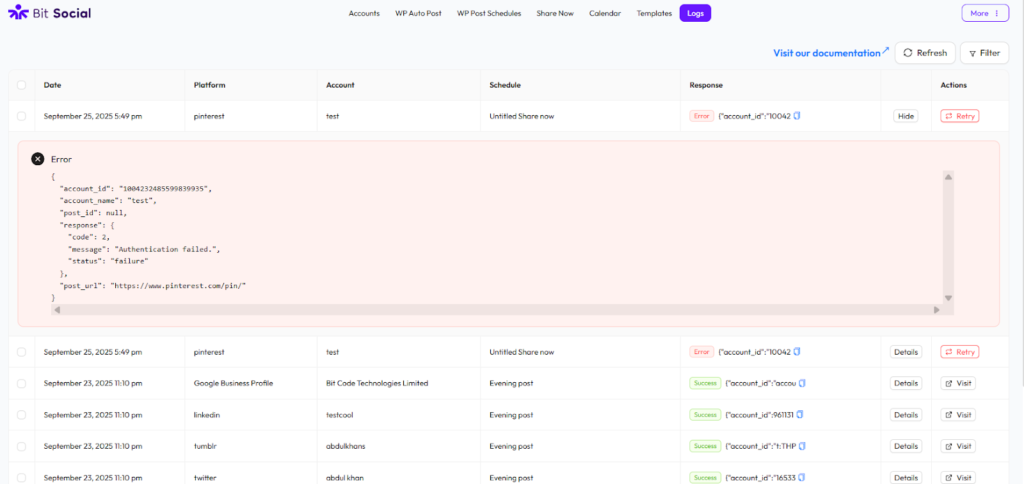
You can track your shared posts in the logs section. See which posts were shared successfully. Check which ones failed. Filter responses for easier management.
Each log entry shows:
- Social media account and platform
- Publish time
- Success or failure status
- Error details if something went wrong
- Retry failed posts
No need to recreate everything from scratch. Just click retry and Bit Social handles the rest.
Group Accounts for Bulk Management
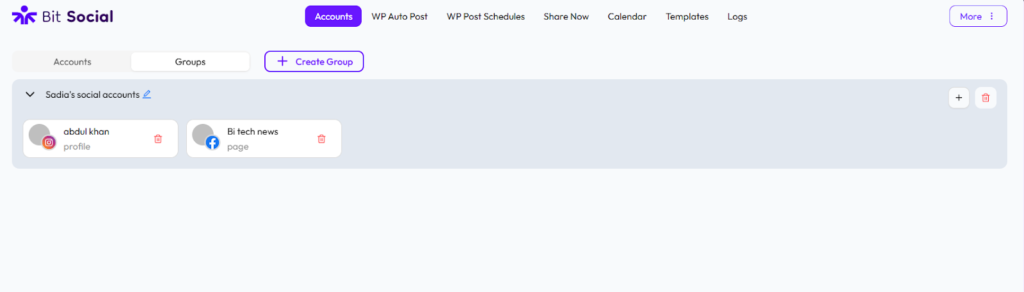
Managing multiple accounts gets easier with account groups. Create groups of multiple social accounts. Share with entire groups with one click.
For example, create a “Personal Brand” group with your personal Facebook, LinkedIn, and Twitter accounts. Create a “Business” group with your company profiles. Switch between groups effortlessly.
This saves time when you have many accounts. You don’t select platforms individually every time. Just pick a group and go.
Cron Jobs for Reliable Scheduling
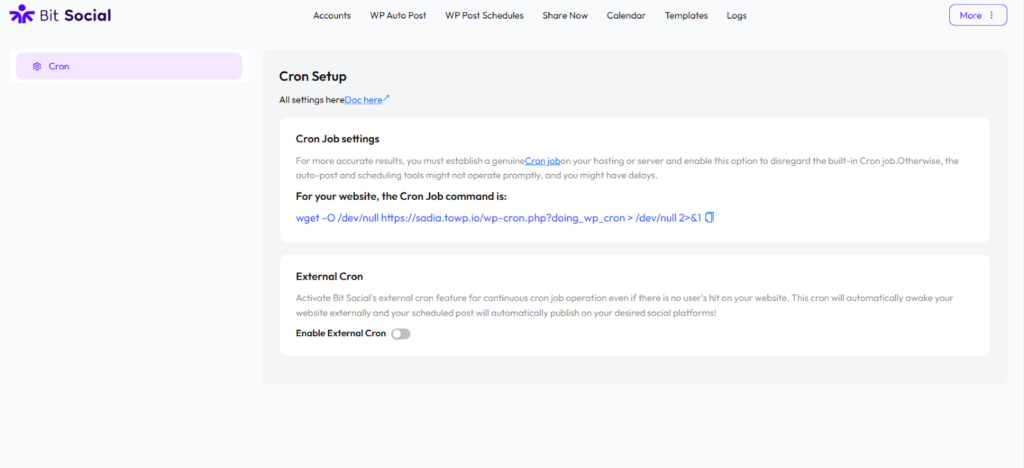
Bit Social uses WordPress cron jobs to handle scheduled posts. This ensures your content publishes on time. Even if you’re offline, your posts go live as scheduled.
You can also use external cron for better reliability. This is perfect for high-traffic sites that need guaranteed posting times.
Real World Examples of Social Media Automation
Let me share how I use Bit Social every day:
- Blog Post Promotion: I publish a new article every Monday. Bit Social shares it to Facebook, LinkedIn, and Twitter automatically with “Auto Post” feature. The post includes the article title, excerpt, and featured image. Everything happens within seconds of publishing.
- Product Launch Announcements: When I add new products to my WooCommerce store, Bit Social creates Pinterest pins and Instagram posts. Each post includes product photos, descriptions, and direct product links. My followers see new products immediately.
- Weekly Newsletter Reminders: Every Friday morning, I schedule a custom post reminding followers about my newsletter. Bit Social shares this to all platforms at 9 AM. I set this up once and it runs automatically every week.
- Event Promotion: When I host webinars, I schedule announcement posts for different platforms. LinkedIn gets a professional version. Facebook gets a casual version. Twitter gets a short version with hashtags. Each platform receives the right message format.
- Behind-the-Scenes Content: I use Share Now to post quick updates. Like photos from my workspace, quick tips, and random thoughts. These go live instantly across my social channels.
These automations help me maintain consistent online visibility. My audience sees regular updates. I spend less time on social media management.
Free vs Pro: Choose Your Plan
Bit Social offers both free and pro versions. Pick the plan that matches your needs. Many WordPress users find it the most affordable social auto poster and scheduler plugin under $100.
Bit Social Free
The free version is perfect for getting started:
- Facebook and LinkedIn support
- Unlimited auto-posting
- Unlimited scheduling
- Connect unlimited accounts
- Filter posts by category and tags
- Basic templates for Facebook and LinkedIn
- Share Now feature
- Complete logs
Bit Social Pro
The pro version unlocks advanced features:
- All 13+ social platforms
- Advanced scheduling options
- Account groups
- WooCommerce product posting
- All media types (featured image, link card, product image, all images)
- Templates for all platforms
- Auto-share pages and custom post types
- Advanced calendar view
- LinkedIn company pages
- Custom delay settings
- Filter hooks for developers
Pricing:
- Starter LTD: $89 one-time payment for one site
- Agency LTD: $149 one-time payment for unlimited sites
Both are lifetime deals. Pay once and use forever. No monthly fees. No surprise charges.
Why Choose Bit Social?
Many social media tools exist. Why pick Bit Social?
It Lives in WordPress. Everything runs from your WordPress dashboard. No external platforms. No separate logins. Manage everything in one place.
Affordable social media plugin with lifetime pricing. No monthly subscriptions. No per-post charges. Unlimited automation for one price.
Unlimited Posting. Share as many posts as you want. Connect as many accounts as you need. No artificial limits.
Easy to Use. The interface is clean and simple. No technical knowledge required. Even beginners can start within minutes.
Regular Updates. The team constantly adds features. New platforms get added regularly, and existing features get improved. The plugin is updated regularly
Great Support. The support team responds quickly. They help with setup issues and fix bugs fast. Also, Bit Social has an active community on Facebook.
Available Resources
Bit Social includes extensive documentation. Every feature has step-by-step guides, video tutorials, and blogs that show you exactly what to do.
Resources include:
- Written documentation for all features
- YouTube video tutorials
- Facebook community group
- Email support
- Regular blog posts with tips and tricks
You’re never stuck without help. The documentation answers most questions. The community shares solutions. Support is always available.
A Final Thought on Bit Social
Bit Social saves hours every week. It removes the tedious parts of social media management. This frees social media managers and bloggers, allowing them to focus on content creation and business growth.
If you manage a WordPress site and struggle with social media posting, you should try Bit Social. The best social auto poster and scheduler plugin in town. It saves time, maintains consistency, and offers fair pricing.
You don’t need to be a tech expert. You only need the desire to work smarter instead of harder. For me, Bit Social has been one of the best investments in my business.


